
The Microsoft 365 price increase 2026 took effect on 1 July 2026, but most organisations haven’t felt it yet. New prices apply at each subscription’s next renewal, so the increase reaches clients one renewal date at a time through the rest of 2026 and into 2027.
For MSPs, that is the real risk. If client contracts still assume old per-seat costs, margin disappears quietly at every renewal. This guide lists every new price, explains exactly when it applies, and gives you a repricing and licence clean-up plan you can run this month.
Table of Contents
- Technical Overview & Background
- Old vs New Prices by Plan
- Core System Prerequisites
- Step-by-Step Implementation Guide
- Architecture & Component Breakdown
- Real-World Use Cases & Enterprise Examples
- Troubleshooting, Edge Cases & Best Practices
- FAQ
- Summary & Key Takeaways
Technical Overview & Background
Microsoft announced the change on 4 December 2025. It applies to commercial and government customers worldwide from 1 July 2026. Microsoft’s stated reason is the large number of features added to the suites in recent years, especially Copilot Chat, security and management tools.
How the new prices reach customers
- New subscriptions bought on or after 1 July 2026 pay the new price.
- Existing subscriptions keep their current price until their next renewal on or after 1 July 2026.
- Annual terms renewed before July locked in old pricing for one more year.
- Seats added mid-term may be charged at the price in effect when you add them. Check this in your CSP portal.
- Government suites with increases above 10% are phased in, no more than 10% per annual adjustment.
Two more cost pressures stack on top for some customers:
- Enterprise Agreement customers lost volume-tier discounts in November 2025.
- Monthly-commitment subscriptions cost more than annual ones, a premium that has applied since the NCE changes.
Old vs New Prices by Plan
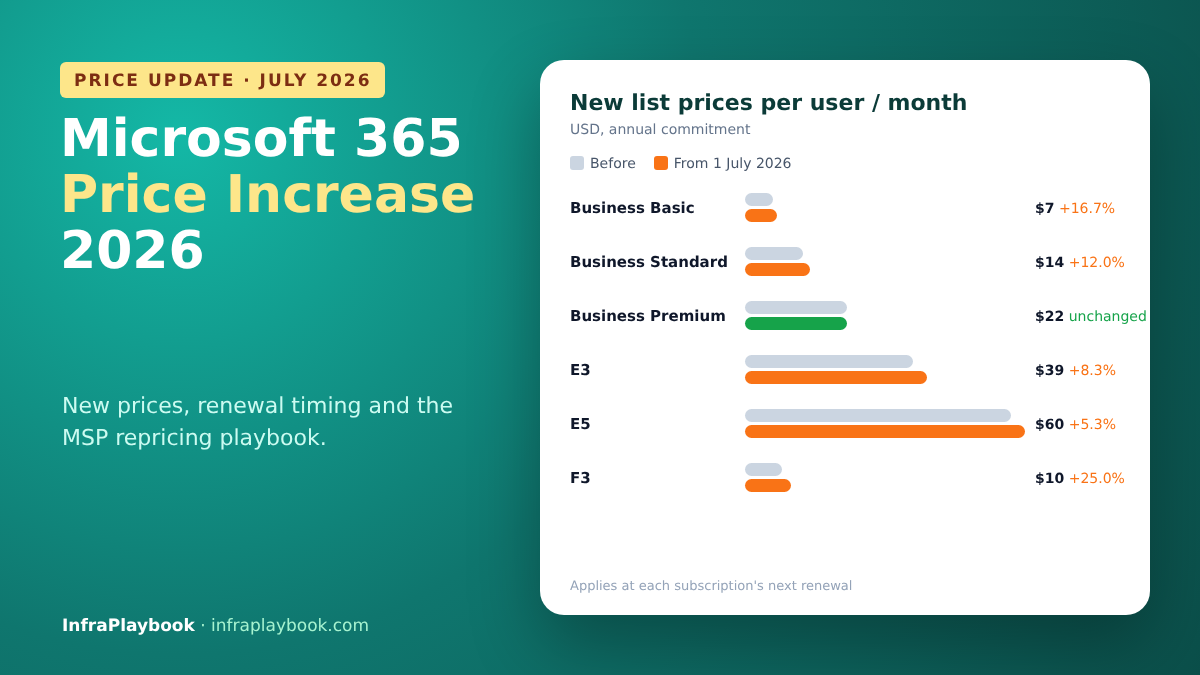
Here is the Microsoft 365 price increase 2026 in full. US commercial list prices, per user per month, annual commitment, with Teams:
| Plan | Before 1 July 2026 | From 1 July 2026 | Change |
|---|---|---|---|
| Microsoft 365 Business Basic | $6.00 | $7.00 | +16.7% |
| Microsoft 365 Business Standard | $12.50 | $14.00 | +12.0% |
| Microsoft 365 Business Premium | $22.00 | $22.00 | No change |
| Office 365 E1 | $10.00 | $10.00 | No change |
| Microsoft 365 E3 | $36.00 | $39.00 | +8.3% |
| Microsoft 365 E5 | $57.00 | $60.00 | +5.3% |
| Microsoft 365 F1 | $2.25 | $3.00 | +33.3% |
| Microsoft 365 F3 | $8.00 | $10.00 | +25.0% |
| Microsoft 365 Apps for business | $8.25 | $9.50 | +15.2% |
| Microsoft 365 Apps for enterprise | $12.00 | $13.50 | +12.5% |
| Microsoft 365 Copilot (add-on) | $30.00 | $30.00 | No change |
Local currency prices vary by market. Always confirm against your CSP price list.
What Microsoft added in return
| Plan | Notable additions |
|---|---|
| Business Basic / Standard | 50 GB more mailbox storage, URL time-of-click protection in Outlook, enhanced Copilot Chat (inbox and calendar awareness, agents in Word, Excel and PowerPoint) |
| E3 | Defender for Office 365 Plan 1, Intune Remote Help, Intune Advanced Analytics and Plan 2 capabilities |
| E5 | Everything in E3, plus Security Copilot capacity, Intune Endpoint Privilege Management, Enterprise Application Management and Microsoft Cloud PKI |
| F1 / F3 | No major new bundled capabilities announced |
The headline insight for MSPs
Business Premium didn’t change. The gap between Business Standard ($14) and Premium ($22) has narrowed from $9.50 to $8.00. Premium includes Intune, Entra ID P1, Defender for Business and Conditional Access. For many SMB clients, the upgrade conversation is now easier than it has been for years.
Core System Prerequisites
Commercial data
- Your CSP price list for the new period (Pax8, TD SYNNEX, Ingram Micro, Microsoft direct, etc.)
- Renewal dates for every client subscription
- Current client contracts: per-seat price, price-change clauses and notice periods
Technical access
- Microsoft Graph PowerShell SDK (
Microsoft.Graphmodule) - GDAP (granular delegated admin) access to client tenants, with at least Global Reader or License Administrator roles
- Entra ID P1 in the tenant to read sign-in activity (included in Business Premium and E3/E5)
A pricing baseline
Know your target margin per seat. If you don’t have one, start with our MSP per-seat pricing model and break-even floor.
Step-by-Step Implementation Guide
Step 1 — Export licence counts from each tenant
Install-Module Microsoft.Graph -Scope CurrentUser
Connect-MgGraph -Scopes "Organization.Read.All","User.Read.All","AuditLog.Read.All"

Get-MgSubscribedSku |
  Select-Object SkuPartNumber,
                @{n='Purchased';e={$_.PrepaidUnits.Enabled}},
                @{n='Assigned';e={$_.ConsumedUnits}},
                @{n='Unassigned';e={$_.PrepaidUnits.Enabled - $_.ConsumedUnits}} |
  Sort-Object SkuPartNumber |
  Export-Csv .\licences.csv -NoTypeInformation
Common SKU part numbers: O365_BUSINESS_ESSENTIALS (Business Basic), O365_BUSINESS_PREMIUM (Business Standard), SPB (Business Premium), SPE_E3, SPE_E5, SPE_F1, M365_F1, SPE_F3.
Step 2 — Find unused and inactive licences
After the Microsoft 365 price increase 2026, every unused seat costs more. Find users who haven’t signed in for 60+ days:
$cutoff = (Get-Date).AddDays(-60)

Get-MgUser -All -Property DisplayName,UserPrincipalName,AccountEnabled,AssignedLicenses,SignInActivity |
  Where-Object { $_.AssignedLicenses.Count -gt 0 } |
  Where-Object {
    -not $_.AccountEnabled -or
    -not $_.SignInActivity.LastSignInDateTime -or
    $_.SignInActivity.LastSignInDateTime -lt $cutoff
  } |
  Select-Object DisplayName, UserPrincipalName, AccountEnabled,
                @{n='LastSignIn';e={$_.SignInActivity.LastSignInDateTime}},
                @{n='Licences';e={$_.AssignedLicenses.Count}} |
  Export-Csv .\inactive-licensed-users.csv -NoTypeInformation
Disabled accounts that still hold licences are the quickest win. Before you remove a licence from a leaver, read our guide to what happens to mailbox and OneDrive data when a licence is removed.
Step 3 — Map renewal dates
In your CSP portal, export each client subscription with its term end date and billing frequency. Then sort by renewal date:
| Client | SKU | Seats | Term | Renews | Old price | New price |
|---|---|---|---|---|---|---|
| Client A | Business Standard | 45 | Annual | 2026-11-01 | $12.50 | $14.00 |
| Client B | Business Basic | 120 | Annual | 2027-02-15 | $6.00 | $7.00 |
| Client C | E3 | 80 | Annual | 2026-12-01 | $36.00 | $39.00 |
The next 90 days of renewals are your priority list.
Step 4 — Calculate the impact per client
This Python script reads the renewal sheet and shows each client’s annual cost increase and your margin before and after:
#!/usr/bin/env python3
"""Microsoft 365 price increase impact calculator for MSPs."""
import csv, sys

NEW_PRICE = {   # USD list, per user per month, annual commitment
    "Business Basic": 7.00, "Business Standard": 14.00, "Business Premium": 22.00,
    "E3": 39.00, "E5": 60.00, "F1": 3.00, "F3": 10.00,
    "Apps for business": 9.50, "Apps for enterprise": 13.50,
}

def main(path):
    total = 0.0
    with open(path, newline="") as f:
        for row in csv.DictReader(f):
            seats = int(row["seats"])
            old_cost = float(row["old_cost"])
            new_cost = NEW_PRICE[row["sku"]]
            sell = float(row["sell_price"])          # what the client pays you per seat
            delta_year = (new_cost - old_cost) * seats * 12
            old_margin = (sell - old_cost) / sell * 100
            new_margin = (sell - new_cost) / sell * 100
            total += delta_year
            print(f"{row['client']:<12} {row['sku']:<18} seats={seats:<4} "
                  f"+${delta_year:,.0f}/yr  margin {old_margin:5.1f}% -> {new_margin:5.1f}%")
    print(f"\nTotal extra licence cost per year: ${total:,.0f}")

if __name__ == "__main__":
    main(sys.argv[1] if len(sys.argv) > 1 else "renewals.csv")
Example renewals.csv:
client,sku,seats,old_cost,sell_price
Client A,Business Standard,45,12.50,15.00
Client B,Business Basic,120,6.00,7.50
Client C,E3,80,36.00,42.00
If you resell Business Standard at $15 with a $12.50 cost, your margin drops from 16.7% to 6.7% at renewal. That is why repricing can’t wait.
Step 5 — Decide the right action per client
| Situation | Recommended action |
|---|---|
| Inactive/unassigned seats | Remove them before renewal |
| Business Standard + separate security add-ons | Compare against Business Premium (unchanged at $22) |
| E3 + Defender for Office 365 P1 add-on | Drop the add-on, since it’s now included in E3 |
| Frontline workers on F1/F3 | Check whether they need a licence at all, or a cheaper shared-device model |
| Monthly term but stable headcount | Move to annual to avoid the monthly premium |
| Price-sensitive client | Reprice with clear notice, and show the added features |
Step 6 — Update contracts and notify clients
- Check your contract clause. Most MSP agreements allow passing through vendor price changes with notice, often 30 days.
- Send written notice before each renewal, with the old price, new price, effective date and the features added.
- Offer options: clean-up savings, a Business Premium upgrade, or annual terms.
- Update your PSA/billing system (ConnectWise, Autotask, HaloPSA) so invoices match on the renewal date.
A short client notice can be as simple as:
Subject: Microsoft 365 pricing change at your next renewal on 1 November 2026

Microsoft increased Microsoft 365 Business Standard from $12.50 to $14.00 per user per month
(list price) from 1 July 2026. Your subscription renews on 1 November 2026, so the new price
applies from that date.

Microsoft added 50 GB of extra mailbox storage, link protection in Outlook and enhanced
Copilot Chat to the plan. We have also reviewed your licences and removed 4 unused seats,
which offsets most of the increase.

Your new monthly total from 1 November will be $X. Reply if you'd like to discuss
Business Premium, which adds device management and advanced security.
Step 7 — Turn on the new features you’re now paying for
Clients are paying for the new features, so make sure they get them:
- E3: configure Defender for Office 365 P1 (Safe Links, Safe Attachments, anti-phishing policies).
- E3/E5: enable Intune Remote Help for your helpdesk.
- Business Basic/Standard: check that Copilot Chat policies and data protection match the client’s rules.
- E5: plan Security Copilot capacity and set alerts for overage.
Delivering visible value is the best defence against “why did my bill go up?”.
Step 8 — Re-check every quarter
# Quick quarterly check: unassigned seats per SKU
Get-MgSubscribedSku |
  Where-Object { ($_.PrepaidUnits.Enabled - $_.ConsumedUnits) -gt 0 } |
  Select-Object SkuPartNumber, @{n='Unassigned';e={$_.PrepaidUnits.Enabled - $_.ConsumedUnits}}
Schedule it in your RMM or as an Azure Automation runbook across all GDAP tenants.
Architecture & Component Breakdown
| Component | Role in the repricing process |
|---|---|
| CSP portal / distributor | Source of truth for cost prices, terms and renewal dates |
| Microsoft Graph API | Licence counts, assignments and sign-in activity |
| GDAP relationships | Least-privilege access to each client tenant |
| Entra ID sign-in logs | Identifies inactive users (needs P1) |
| PSA / billing system | Client-facing price and invoices |
| Client agreement | Defines notice period and price pass-through rights |
| Licence optimisation report | Evidence for clients and savings to offset the increase |
Process flow
CSP renewal export ──► renewal calendar (next 90 days)
        │
Graph per tenant ──► licences + inactive users ──► clean-up list
        │
        ▼
impact calculator ──► margin before/after per client
        │
        ▼
decision: remove seats │ upgrade to Premium │ annual term │ reprice
        │
        ▼
client notice (30 days) ──► PSA price update ──► renewal ──► enable new features
Real-World Use Cases & Enterprise Examples
1. MSP with 40 SMB clients on Business Standard
The MSP finds 11% of seats are unassigned or held by leavers. Removing them before renewal saves more than the price increase costs for most clients. The renewal letters lead with the saving, so very few clients push back.
2. 80-seat company moving to Business Premium
The client paid for Business Standard plus Defender for Business and Intune add-ons. After the change, Business Premium at $22 is cheaper than the bundle, and it adds Conditional Access. The MSP gets a security upgrade and a higher-value contract.
3. Enterprise on E3 with Defender add-on
A 600-seat E3 customer was paying separately for Defender for Office 365 Plan 1. Since it’s now included in E3, removing the add-on offsets a large part of the $3 per user increase.
4. Retail chain with frontline staff
A retailer with 900 F1 users faces a 33% increase. A review shows 250 seasonal accounts are inactive half the year. A joiner–leaver process tied to HR cuts the licence count instead of absorbing the full rise.
5. Nonprofit client
Nonprofit pricing moved by similar percentages from a discounted base. The MSP checks grant eligibility and discount status with the distributor before quoting, so there are no renewal surprises.
Troubleshooting, Edge Cases & Best Practices
Client says the price went up mid-term
Cause: seats were added after 1 July 2026 at the new price, or the subscription was monthly.
Fix: check the purchase date of each seat block in the CSP portal and explain the split on the invoice.
Sign-in activity is empty in Graph
Cause: the tenant lacks Entra ID P1, or the app lacks AuditLog.Read.All.
Fix: grant the scope, or use the Microsoft 365 admin centre usage reports as a fallback.
Removing a licence deleted data unexpectedly
Cause: the mailbox or OneDrive entered its deletion lifecycle after the licence was removed.
Fix: convert leavers to shared mailboxes or set retention policies first. Remember that Microsoft 365 isn’t a backup, as explained in Does Microsoft 365 back up my data?
Client contract has no price-change clause
Cause: an older agreement with fixed per-seat pricing.
Fix: absorb the increase until the contract term ends, then renew with a vendor pass-through clause. Treat the extra work as out of scope where relevant (see our out-of-scope pricing guide).
Currency differences
Cause: local price lists don’t map exactly to USD percentages.
Fix: always use your distributor’s local-currency price list for quotes.
Microsoft 365 price increase 2026 best practices
- Work from the renewal calendar, not the announcement date.
- Clean up licences before every renewal. It’s the fastest way to offset the increase.
- Lead client conversations with value: features added, savings found, security improved.
- Revisit Business Premium for every Business Standard client.
- Remove add-ons now included in E3/E5.
- Add a vendor price pass-through clause to every new MSP agreement.
- Automate a quarterly licence report across all tenants.
FAQ
When did the Microsoft 365 price increase take effect?
On 1 July 2026. New subscriptions pay the new prices immediately. Existing subscriptions move to the new prices at their next renewal on or after 1 July 2026.
How much did Microsoft 365 Business Standard increase?
The US list price rose from $12.50 to $14.00 per user per month on an annual commitment, an increase of 12%. Business Basic rose from $6.00 to $7.00, while Business Premium stayed at $22.00.
Did Microsoft 365 E3 and E5 prices change?
Yes. E3 rose from $36 to $39 and E5 from $57 to $60 per user per month. E3 now includes Defender for Office 365 Plan 1 and more Intune capabilities, and E5 adds Security Copilot capacity and additional Intune and PKI features.
How can MSPs reduce the impact of the price increase?
Remove unused and inactive licences before each renewal, drop add-ons now included in the suites, move stable clients to annual terms, and compare Business Standard plus add-ons with Business Premium. Then reprice client contracts with proper notice.
Is Microsoft 365 Copilot more expensive now?
The Microsoft 365 Copilot add-on stayed at $30 per user per month. The suites themselves now include enhanced Copilot Chat, which is part of Microsoft’s justification for the price rise.
Summary & Key Takeaways
The Microsoft 365 price increase 2026 is moving through the market renewal by renewal. MSPs that clean up licences, rethink plan choices and reprice with clear notice can protect their margins and often improve client security at the same time.
Key takeaways:
- Effective 1 July 2026, applied at each subscription’s next renewal.
- Biggest rises: F1 +33%, F3 +25%, Business Basic +16.7%, Business Standard +12%.
- Unchanged: Business Premium ($22), Office 365 E1 and the Copilot add-on.
- E3 gains Defender for Office 365 P1, so remove that add-on.
- Clean up inactive seats with Microsoft Graph before every renewal.
- Reprice contracts with notice, and lead with the value added.
Next in this series: Proxmox Ceph Setup: Hardware Sizing, Networking and the Mistakes That Kill Performance.
Editorial note: Prices are US commercial list prices per user per month on annual terms, as reported by Beancount and TechInformed from Microsoft’s December 2025 announcement. Your CSP price list is the final reference.