
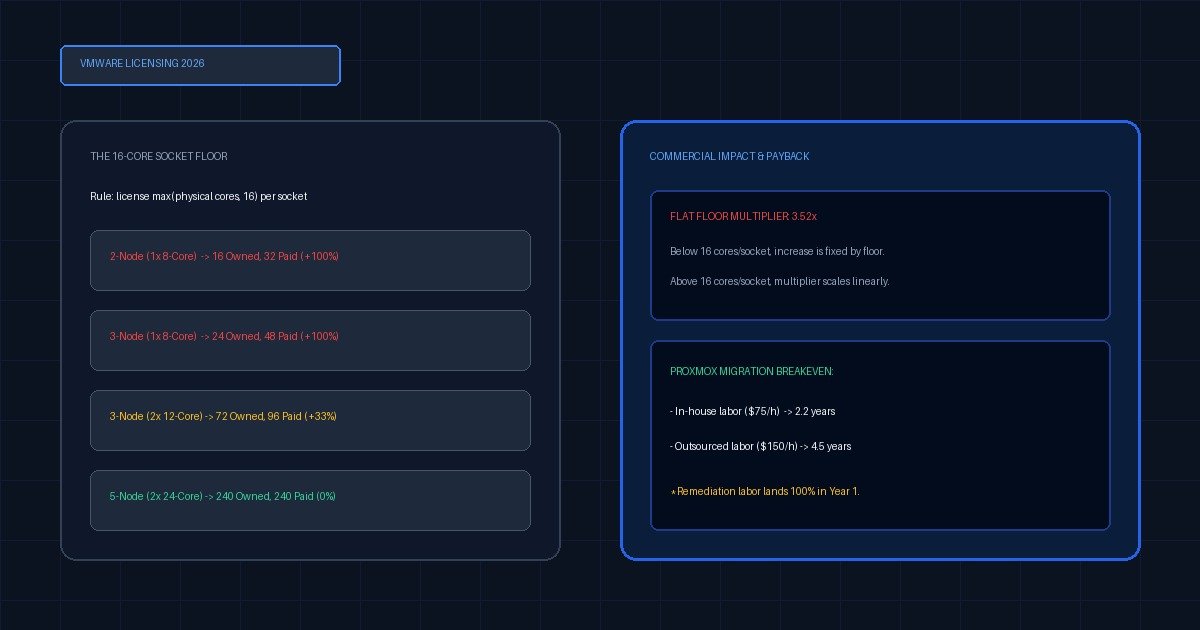
Broadcom retired perpetual per-socket vSphere licensing in December 2023. Small businesses now buy vSphere Standard, Foundation or Cloud Foundation as per-core subscriptions, with a mandatory 16-core minimum per CPU socket. On typical 8-to-16-core SMB hardware that converts a flat per-socket renewal into a per-core bill roughly 2.5 to 5 times higher.
Two kinds of article dominate this search. The first is written for enterprises running multi-cluster VCF estates, where the core minimum is irrelevant because every socket is already past it. The second is a rant, and rants have a habit of quoting the 72-core minimum that Broadcom announced in April 2025 and then withdrew after reseller and customer protest. Neither is useful if you run three hosts in a comms cupboard.
So this page does something narrower. It states the rules actually in force, sourced to Broadcom’s own knowledge base rather than to commentary, builds the core count for eight real SMB hardware shapes, and puts a declared per-core rate against them. The dollars are a model, and labelled as one, because Broadcom publishes no list price.
- The floor is 16 cores per CPU socket, not 72. The 72-core minimum was announced in April 2025 and withdrawn the same year. Pages still quoting it describe a rule that no longer exists — on a 2-node single-socket 16-core pair the difference is 32 licensable cores against 72.
- Perpetual keys keep working after SnS expires. Broadcom’s own KB is unambiguous: hosts and vCenter keep operating, VMs stay powered, vMotion and snapshots still work, no feature is switched off. You lose patch downloads and support cases. The risk is security drift, not a shutdown.
- Essentials and Essentials Plus are gone. The bundle that made vSphere affordable for 3-host shops was retired in late 2024, with nothing beneath vSphere Foundation to replace it. A two-node cluster now starts at the per-core rate an enterprise pays.
- The minimum punishes low core counts, so a hardware refresh changes the maths. Under per-socket licensing, denser CPUs were free upside. Under a 16-core floor an 8-core socket costs what a 16-core socket costs, so the cheapest response is often fewer, denser hosts rather than the same estate re-licensed.
- Migration to Proxmox VE rarely pays back inside three years at outsourced labour rates. On a modelled 3-node, 72-core estate the subscription saving is real but one-off remediation labour dominates. In-house teams break even near year two; consultancy rates do not break even inside four.
What actually changed in VMware licensing for small business?
Three things changed and they compound. Perpetual licensing ended in December 2023, so there is no version you buy once and keep. The unit of licensing moved from the CPU socket to the physical core, with a mandatory minimum of 16 cores charged per socket however few cores it holds. And the Essentials and Essentials Plus kits, the only SKUs priced for a three-host business, were retired in late 2024 with no replacement beneath vSphere Foundation.
Taken one at a time, none of those is fatal. Subscription pricing is now the industry norm and was always going to arrive. Per-core licensing is how Microsoft has sold Windows Server since 2016 and nobody rioted. Retiring a bundle is ordinary product management.
The problem is the interaction. Per-core licensing with a floor is a tax on low-density hardware, and small businesses run low-density hardware by definition. A shop with two single-socket 8-core hosts is not being asked to pay per core — it is being asked to pay for 32 cores while owning 16. Simultaneously, the SKU that would have absorbed that increase no longer exists. The bundle went away in the same eighteen months that the unit of measure changed underneath it.
A fourth change gets less attention and costs real money. Under VVF and VCF v9 you must run a VCF Operations instance and a vCenter instance in order to license your ESXi hosts at all — management infrastructure a two-node shop may never have deployed, consuming resources on a cluster that had none spare.
How does the 16-core minimum per CPU socket work in practice?
The rule operates per socket, not per host and not per cluster, which is the part most summaries get wrong. For every populated CPU socket you count the physical cores in that socket, and if the number is below sixteen you license sixteen anyway. You then add those per-socket figures together. Sockets above sixteen cores are licensed at their true count, so the floor never rounds downward and it never averages across a mixed estate.
Broadcom’s own documentation works this in two directions. A cluster of three hosts with one 8-core CPU each has 24 physical cores and requires 48 licensed cores. A mixed pair — one host with two 8-core CPUs, one host with two 24-core CPUs — rounds the first host up to 32 and leaves the second at 48, for 80 cores total. The dense host subsidises nothing.
That is why two estates with identical core totals carry different bills. Forty-eight physical cores, arranged two ways: six single-socket 8-core hosts round to 96 licensable cores, three single-socket 16-core hosts license at 48. Same compute, double the licence count on the wider estate.
Here is the core-count matrix for eight common SMB shapes. There are no prices in this table on purpose — the core arithmetic is fact, and it holds whatever anyone eventually charges you per core.
| Estate | Shape | Physical cores | Licensable cores | Floor penalty |
|---|---|---|---|---|
| A | 1 host x 1 CPU x 8 cores | 8 | 16 | +8 (+100%) |
| B | 2 hosts x 1 CPU x 8 cores | 16 | 32 | +16 (+100%) |
| C | 2 hosts x 1 CPU x 16 cores | 32 | 32 | none |
| D | 2 hosts x 2 CPU x 10 cores | 40 | 64 | +24 (+60%) |
| E | 3 hosts x 1 CPU x 8 cores | 24 | 48 | +24 (+100%) |
| F | 3 hosts x 2 CPU x 12 cores | 72 | 96 | +24 (+33%) |
| G | 5 hosts x 2 CPU x 12 cores | 120 | 160 | +40 (+33%) |
| H | 5 hosts x 2 CPU x 24 cores | 240 | 240 | none |
Estate E is Broadcom’s published example, reproduced deliberately so you can check our arithmetic against the vendor’s before trusting anything further down this page.
Note what rows C and H have in common. Once a socket carries sixteen or more cores the floor stops mattering, and the whole penalty disappears. The 16-core minimum is not a small-business surcharge in the abstract — it is a surcharge on sockets with fewer than sixteen cores, which small businesses happen to own more of than anyone else.
What does a 2-node or 3-node vSphere cluster cost under the new model?
Nobody can answer that as fact, and any page that gives you a firm figure is inventing it. Broadcom does not publish list pricing for vSphere Foundation or Cloud Foundation, quotes are partner-mediated and discount-dependent, and the public estimates in circulation vary by roughly forty percent between sources. What can be answered honestly is the shape of the increase, because that follows from the core arithmetic rather than from the rate.
So the table below is a model, and here are its declared inputs. The subscription rate is set at $110 per core per year, which sits deliberately below the third-party estimate band of roughly $135 to $190 per core per year at list. Understating the rate understates the increase, which is the safer direction to be wrong in. The legacy baseline is $500 per socket per year for vSphere Standard production support and subscription — a flat per-socket charge, which is exactly the thing that changed.
| Estate | Licensable cores | Model subscription /yr | Model 3-year | Legacy SnS /yr | Multiplier |
|---|---|---|---|---|---|
| A | 16 | $1,760 | $5,280 | $500 | 3.52x |
| B | 32 | $3,520 | $10,560 | $1,000 | 3.52x |
| C | 32 | $3,520 | $10,560 | $1,000 | 3.52x |
| D | 64 | $7,040 | $21,120 | $2,000 | 3.52x |
| E | 48 | $5,280 | $15,840 | $1,500 | 3.52x |
| F | 96 | $10,560 | $31,680 | $3,000 | 3.52x |
| G | 160 | $17,600 | $52,800 | $5,000 | 3.52x |
| H | 240 | $26,400 | $79,200 | $5,000 | 5.28x |
The constant 3.52 in that column is not a rounding accident, and it is the most useful thing on this page. Wherever the 16-core floor binds, the multiplier is fixed by the floor rather than by your estate, because both sides of the ratio scale with socket count:
multiplier = (max(cores_per_socket, 16) x rate_per_core) / SnS_per_socket

  at rate = 110 and SnS = 500:   multiplier = max(c, 16) x 0.22

    c =  8 cores/socket  ->  16 x 0.22  =  3.52x
    c = 12 cores/socket  ->  16 x 0.22  =  3.52x
    c = 16 cores/socket  ->  16 x 0.22  =  3.52x
    c = 24 cores/socket  ->  24 x 0.22  =  5.28x
    c = 32 cores/socket  ->  32 x 0.22  =  7.04x
Read that formula rather than the table. Below sixteen cores per socket your multiplier is flat, because you are paying the floor no matter how thin the socket is. Above sixteen it climbs linearly with density, because per-socket support never charged you for cores and per-core subscription does. Every argument about the rate moves the whole column up or down together; it does not change the shape.
Estates on Essentials Plus rather than Standard fare worse still. That kit bundled three hosts and six sockets into a single renewal in the low four figures, so the effective per-socket baseline was a fraction of $500. Those customers report increases in the 350 to 450 percent range, and the arithmetic above says they should.
What happens if you keep running existing perpetual licenses without SnS?
Your infrastructure keeps running. Broadcom’s knowledge base states plainly that hosts and vCenter continue to operate normally after support and subscription lapses, that there is no automated shutdown, that virtual machines stay powered on, and that features including vMotion and snapshots remain available. Nothing in the product phones home and disables itself. The perpetual licence you bought is still a perpetual licence.
What you lose is everything that arrives after the expiry date. You cannot download patches, updates or upgrade bundles from the support portal, and you cannot open a support request. Broadcom’s own wording is that security posture is at risk because non-critical patches cannot be retrieved — which is a mild way of saying your hypervisor is frozen at whatever build it reached on the day the contract ended, indefinitely.
Two operational traps sit inside that gap and both are avoidable. Adding a host to an unsupported cluster is a bad idea, because you cannot patch the new host to match and you cannot get help when the versions diverge. Attempting a major version upgrade is a worse one, because the bundles you need are behind the same portal you no longer have.
There is also an enforcement dimension that is genuinely new. Broadcom has sent cease-and-desist correspondence to customers whose subscriptions lapsed, demanding removal of updates applied after expiry, and has reasserted usage reporting and audit rights that survive the end of the contract. Running unsupported is legal. Running patched-but-unsupported is where the letters go.
The honest framing: an expired perpetual estate is a controlled, time-limited position. It buys twelve or eighteen months of decision-making room. It is not a licensing strategy, because the security drift compounds every month you hold it.
When is staying on VMware cheaper than migrating to Proxmox?
More often than the migration commentary admits, and the deciding variable is not the licence price. It is where your labour comes from. Subscription savings after a move to Proxmox VE are real and recurring, but the one-off remediation cost arrives entirely in year one, and on a small estate it often exceeds three years of the saving it buys. Whether migration pays back inside your planning horizon is a question about your team, not about Broadcom.
Take Estate F — three hosts, two sockets each, twelve cores per socket, 96 licensable cores, running forty virtual machines. Proxmox publishes its list pricing, so the subscription side of the comparison is fact rather than model: six sockets on a mid-tier subscription, converted from euros at a stated rate, lands near $3,450 per year against the modelled $10,560 for VVF. The recurring saving is about $7,100 a year.
Now cost the move. Twenty-five Windows guests needing storage controller and driver remediation at six hours each, fifteen Linux guests at ninety minutes, plus forty hours to build and validate the cluster, is roughly 212 hours.
  25 Windows guests x 6.0 h   = 150.0 h
  15 Linux guests   x 1.5 h   =  22.5 h
  cluster build and validate  =  40.0 h
                                -------
                        total   212.5 h

  at $150/h (outsourced)  = $31,875   payback 4.5 years
  at  $75/h (in-house)    = $15,938   payback 2.2 years

  3-year stay   = $31,680
  3-year move   = $10,350 subscription + one-off above
At an outsourced rate the three-year cost of moving is around $42,000 against $31,700 for staying, and migration loses. At an in-house rate it is around $26,300 against $31,700, and migration wins by roughly $5,400. The licence figures did not move between those two outcomes. Only the labour rate did.
That is the decision framework in one line, and here it is in four dimensions. Score each row honestly, because the failure mode is scoring the row you wish were true.
| Dimension | Stay on VMware | Migrate to Proxmox |
|---|---|---|
| Compliance regime | Attestation names VMware, or auditor requires vendor support contract | No vendor-named control; support contract satisfiable by Proxmox subscription |
| Hardware life remaining | Under 24 months — refresh forces the decision anyway, do it once | Over 36 months — the estate you migrate is the estate you keep |
| Backup tooling | Product has no Proxmox target, or licence is VMware-tied and non-transferable | Product supports Proxmox VE natively, or you are re-tendering backup regardless |
| In-house Linux depth | No one on the team runs Debian in anger; every incident becomes a support call | At least one engineer comfortable at a Linux shell without a runbook |
The rule for reading it: any single row landing hard in the “stay” column outweighs three rows landing in “migrate”, because each of those is a constraint rather than a preference. A compliance attestation that names the hypervisor is not something goodwill overcomes, and a two-year-old chassis is not something you migrate twice.
What are the hidden costs of migrating away from vSphere?
The subscription delta is the number everyone models and it is the smallest part of the bill. The costs that ruin migration budgets are the ones with no line item — guest remediation that runs longer per VM than planned, a backup product that technically supports the new platform but at a different RPO, monitoring and agent tooling that has to be re-pointed, and storage behaviour that looks identical until a pool fills.
Windows guests are where the hours go. A VM imported from vSphere boots with a storage controller it was never built for, and the remediation is a per-guest task that resists batching. Six hours per Windows guest is a planning figure, not a worst case, and the estates that overrun are the ones that budgeted two. Storage is where the surprises go: imported disks routinely arrive with discard disabled, and the resulting broken discard chain on imported disks fills a thin pool months after a migration everybody signed off as complete.
Backup deserves its own line. Proxmox VE support now exists in the mainstream enterprise backup products, but “supported” and “supported the way you run it” are different claims. Check application-aware processing, instant recovery and your retention policy specifically, and check whether your licence transfers to a new hypervisor or has to be repurchased.
There is also organisational cost with no line item. Runbooks are written against vCenter. Escalation paths assume a vendor case number. Monitoring thresholds were tuned against ESXi metrics that carry different names on the new platform. None of it is hard; all of it is hours.
If you are costing a move, the failure patterns are worth reading before the budget is signed rather than after — we have documented five reasons migrations fail from projects that ran over, and four of the five are versions of “the licence arithmetic was right and the labour estimate was not.” For the labour rate itself, our MSP cost buildup shows how a fully loaded engineer hour actually assembles, which is the input that decides this whole comparison.
How do you calculate your estate’s 3-year licensing delta?
Seven steps, and you can do it in a spreadsheet in twenty minutes. Count licensable cores per socket first, then apply your quoted rate rather than any published estimate, then cost the alternative including its labour. The delta that matters is three-year total cost of both paths, not the annual subscription difference, because the migration one-off lands entirely in year one and an annual comparison hides it.
Step 1 — Count licensable cores
For every populated socket in the estate, take the greater of its physical core count and sixteen. Sum across sockets. Do not aggregate at host or cluster level; the floor applies per socket and aggregating first will understate a mixed estate.
Step 2 — Get a real quote, then model around it
Ask your reseller for the per-core annual figure for the edition you need, and use that number rather than ours. If no quote arrives in time, run the model at both $135 and $190 per core and treat the pair as a range instead of picking a midpoint and forgetting it was a guess.
Step 3 — Establish the legacy baseline honestly
Pull your last renewal invoice and use the actual figure. This is the input people get wrong, usually by setting a discounted multi-year prepayment against a list-price subscription and producing a multiplier that flatters the complaint.
Step 4 — Cost the alternative subscription
Proxmox VE is priced per CPU socket per year, published, and unaffected by core count — which is why the comparison favours it on low-density hardware. Take the tier you would actually buy, not the community one, if the compliance row above requires a support contract.
Step 5 — Cost the migration labour
Count Windows and Linux guests separately, apply hours per guest, add cluster build and validation, and multiply by the loaded rate for whoever does the work. If that is your own team, use their loaded cost rather than zero; an internal migration still displaces something.
Step 6 — Compute both three-year totals
Stay is three times the annual subscription. Move is three times the alternative subscription plus the entire one-off. Add any hardware refresh either path forces, because a refresh that eliminates the 16-core penalty moves the stay column materially.
Step 7 — Test the result against the constraints
Run the four-dimension framework. If any row is a hard stay, the arithmetic is advisory rather than decisive. Financial models do not overrule compliance attestations, and the right output here is sometimes “stay, and budget for it” with numbers behind it.
Sources
- Understanding the 16-core minimum per CPU for VCF and VVF licensing — Broadcom knowledge base, KB 313548. Primary source for the core minimum rule and the worked examples reproduced as Estate E and the mixed-host case. Also the source for the VCF Operations and vCenter requirement under v9.
- Impact of expired Support and Subscription on perpetual VMware licenses — Broadcom knowledge base, KB 429208. Primary source for continued operation after SnS lapse, the absence of any automated shutdown, and the specific restrictions on patch download and support case creation.
- Arrow warns VMware licensing change will hit small customers — The Register, 28 March 2025. Contemporaneous reporting of the 72-core minimum announcement, including reseller reaction. Cited for the announcement only; see source 4 for what happened next.
- VMware licensing changes and what they mean in practice — StarWind, November 2025. Documents the reversal of the 72-core minimum later in 2025 and the return to the 16-core floor, with the SMB impact quantified. This reversal is the correction this article exists to make: a large share of currently ranking pages still quote 72.
- Proxmox VE subscription pricing — Proxmox Server Solutions. Per-socket annual list pricing, published openly. Verify at publication date; the euro figures are converted to USD at a stated rate in the text rather than silently.
- Our own cost model — declared inputs, published formula, reproduced in full above so a reader can substitute their own quoted rate. Not a survey, not observed Broadcom pricing, and labelled as a model wherever it appears.