
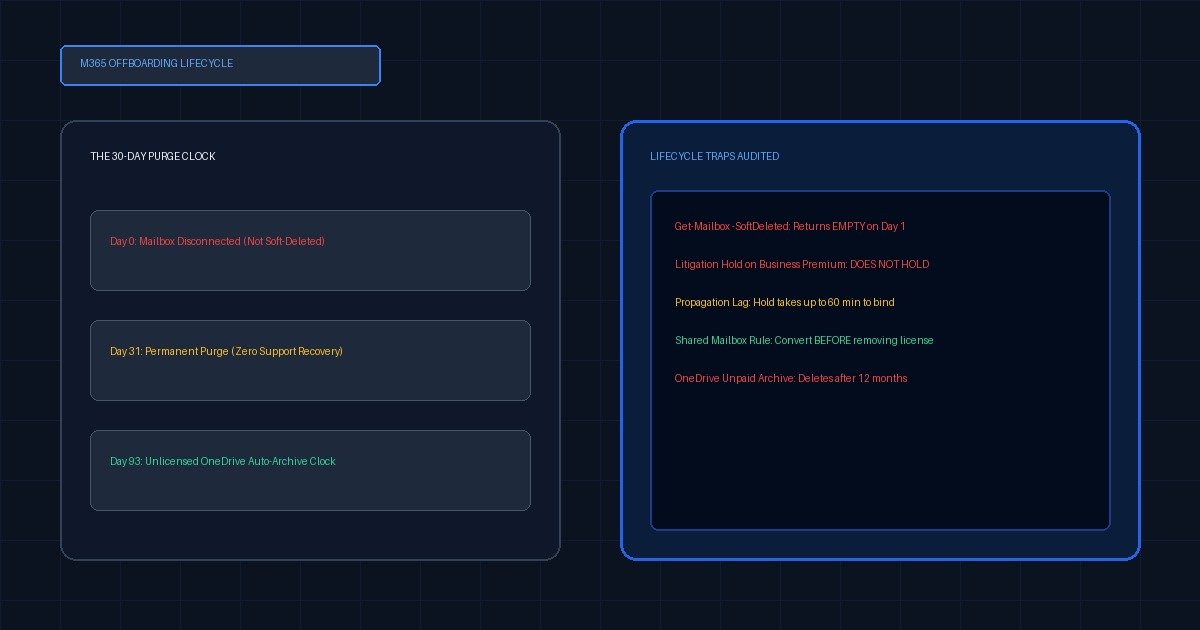
Removing a license immediately disconnects the Exchange mailbox — invisible to Get-Mailbox — and Exchange Online permanently deletes it after 30 days. OneDrive is different: its cleanup clock starts when the account is deleted, not when it is unlicensed. Apply and verify a hold before removing anything, because Business Premium cannot create inactive mailboxes.
Offboarding is where the subscription bill gets managed. Someone leaves, the ticket says reclaim the license, and an engineer unassigns it that afternoon because $22 a month across forty leavers is a real number on a real P&L. The data, everyone assumes, is fine. There is a retention policy. Microsoft keeps things for thirty days.
Three months later legal asks for the leaver’s mailbox, and the engineer who pulls the license runs the obvious cmdlet and gets nothing back. Not an error — nothing. An empty result set, which reads exactly like “this data no longer exists.”
Sometimes it does not exist. More often it exists and is unaddressable, and the difference between those two states is a set of details that Microsoft documents clearly and almost nobody reads in the right order.
- License removal disconnects the Exchange mailbox rather than soft-deleting it.
Get-Mailbox -SoftDeletedMailboxandGet-Mailbox -IncludeInactiveboth return nothing for a disconnected mailbox, so the standard recovery lookup reports absence when the data is still there. Reassigning a license within 30 days reconnects it; after 30 days Exchange Online deletes it permanently. - Removing a license does not start the OneDrive deletion clock. That clock starts when the account is deleted from Entra ID, and Microsoft states plainly that no other action triggers it — not sign-in blocks, not unlicensing.
- Microsoft 365 Business Premium carries Litigation Hold but is not listed for inactive mailboxes.
Set-Mailbox -LitigationHoldEnabled $truereturns success,Get-MailboxreportsTrue, and the mailbox still will not survive account deletion on that SKU. - An unlicensed OneDrive is auto-archived on its 93rd unlicensed day, and after twelve months of unpaid archive the content may be deleted regardless of retention settings, retention policies, eDiscovery and all holds. This is the one clock that outranks your holds.
- A hold may take up to 60 minutes to take effect, and an inactive mailbox is only created if the hold was already in place before the account was deleted. Verify the hold, wait, then remove the license.
What happens to mailbox and OneDrive data when you remove a Microsoft 365 license?
Exchange Online disconnects the mailbox the moment the license is removed or expires. The data stays in place for 30 days and reassigning a license reconnects it; on day 31 Exchange Online deletes it permanently. OneDrive behaves differently — unlicensing does not start its deletion clock at all, though it does start a separate 93-day countdown to archiving.
That divergence is the whole problem. Administrators reason about offboarding as one action with one consequence, because the admin center presents it that way. It is four consequences, on four timers, governed by three triggers — and only some of them respond to the holds you configured.
Asset 1 — The M365 Offboarding Data Lifecycle Matrix
Columns are actions an administrator actually performs; rows are the objects those actions land on.
| Workload | Licence removed, account kept | Litigation Hold applied before removal | M365 retention policy (retain) | User account deleted from Entra ID |
|---|---|---|---|---|
| Exchange mailbox | Disconnected immediately. Not in EAC, not returned by -SoftDeletedMailbox or -IncludeInactive. Reconnect by reassigning a licence within 30 days; permanent deletion at day 31. | Hold travels with the mailbox, but the mailbox is still disconnected and still purged at day 31 unless a licence returns. Hold protects content, not addressability. | Same as Litigation Hold for content. Retention set to delete only does not preserve. Exchange MRM policies do not count. | Soft-deleted 30 days, recoverable by restoring the user. Becomes an inactive mailbox only if a hold was already applied before deletion — and only on a SKU that supports inactive mailboxes. |
| Shared mailbox | Survives. Unlicensed cap 50 GB; 100 GB needs EXO Plan 2. Must have been licensed at the moment of conversion. | Requires EXO Plan 2, or EXO Plan 1 plus the Exchange Online Archiving add-on. Not available on an unlicensed Plan 1 shared mailbox. | Applies normally. | Destroys it. The user account anchors the shared mailbox. Deleting the account deletes the mailbox. |
| OneDrive | Clock does not start. Site remains, admin can still grant access. Auto-archived on the 93rd unlicensed day; after 12 months unpaid archive, deletion may occur regardless of retention, eDiscovery and all holds. | Hold applies to live site content. Does not reach into the site collection recycle bin, which is not indexed. | Takes precedence over the standard deletion process — can delete before 30 days or retain longer. | Retention period starts here. Default 30 days, configurable 30–3650. Manager auto-granted access; reminder e-mail at 7 days. Then site collection recycle bin for 93 days, PowerShell-only restore. |
| Teams chat (1:1 / group) | Lives in a hidden folder in each participant’s mailbox, so it follows the mailbox above — and copies survive in every other participant’s mailbox. | Held via the mailbox hold. Expired items land in the hidden SubstrateHolds folder. | Held via the mailbox. Items sit in SubstrateHolds at least 1 day; the timer job runs every 1–7 days. | Follows the mailbox. Other participants’ copies are unaffected. A user-deleted message does not enter SubstrateHolds for 21 days. |
| SharePoint personal site | Unaffected by unlicensing itself; shares OneDrive’s archive clock. | Held as site content. | Retention settings take precedence over standard deletion. | Follows the OneDrive lifecycle: retention window, then 93-day site collection recycle bin. |
Values as at 28 August 2026; every cell is sourced below. Re-verify before quoting — Microsoft revises these windows, and a dated matrix is only useful because it is dated.
Why does Get-Mailbox find nothing after you remove the license?
Because the mailbox is not soft-deleted. It is disconnected — disabled but present — and disconnected mailboxes are not surfaced by the Exchange admin center, nor returned by Get-Mailbox -SoftDeletedMailbox, nor by Get-Mailbox -IncludeInactive. The two cmdlets an administrator reaches for during a recovery both return empty for the one state license removal actually produces.
This is a vocabulary problem rather than a technical one. “Soft-deleted,” “inactive” and “disconnected” are three distinct object states with three distinct discovery paths, and each doc is written as though you already know which one you are in.
A soft-deleted mailbox is what you get when the user account is deleted. An inactive mailbox is a type of soft-deleted mailbox that had a hold on it at the moment of deletion. A disconnected mailbox is what you get when the license is removed while the account still exists. Only the first two are searchable with the cmdlets everyone knows.
The practical consequence: an engineer verifying that a leaver’s data is recoverable will run Get-Mailbox -SoftDeletedMailbox, see an empty result, and report the data as gone. It is not gone. It is thirty days from gone, and the fix — reassign any Exchange-bearing license — takes ninety seconds. After day 31 there is no fix at all, and no support ticket recovers it.
Does removing a license start the OneDrive deletion clock?
No. Microsoft states it explicitly: the OneDrive cleanup retention period begins when the user account is deleted from Entra ID, and no other action causes the cleanup process to occur, including blocking the user from signing in or removing the user’s license. If you unassign a license and leave the account in place, the OneDrive site sits there indefinitely and an administrator can still grant themselves access to it.
That is the reassuring half. The other half is a clock nobody talks about.
Unlicensed OneDrive accounts are auto-archived on their 93rd unlicensed day. Archived content is still held while the archive is paid for. But after twelve months of unpaid storage, Microsoft’s documentation says the data might be deleted regardless of retention settings, retention policies, eDiscovery, and all holds.
Read that clause again, because it inverts the mental model most compliance programmes are built on. Every other mechanism in this article treats a hold as a trump card. This one does not. A hold is a promise Microsoft makes about content in a service you are paying for; it is not a promise about content in a service you stopped paying for.
When the account is deleted, the documented sequence runs: the retention period starts at default 30 days, configurable anywhere from 30 to 3,650 via the SharePoint admin center or Set-SPOTenant -OrphanedPersonalSitesRetentionPeriod. The user’s manager is automatically granted access — this is the Enable access delegation setting under My Site Cleanup — with a secondary owner used if no manager is recorded, and a reminder e-mail seven days before expiry. Then the site moves to the site collection recycle bin for 93 days, restorable only via PowerShell.
One detail in that sequence quietly breaks eDiscovery: the recycle bin is not indexed, so a hold cannot locate content there in order to hold it. Content that reaches the bin is recoverable by an administrator who knows it exists and invisible to anyone searching for it.
Which licenses actually support inactive mailboxes?
Inactive mailboxes are listed in the Exchange Online service description for Microsoft 365 and Office 365 E3 and E5, and for Exchange Online Plan 2. They are not listed for Business Basic, Business Standard, Business Premium, Office 365 E1, F3, Exchange Online Plan 1 or Kiosk. Litigation Hold has a different and wider availability list, and the gap between those two lists is where offboarding procedures fail silently.
Here is the trap in full. Business Premium does support Litigation Hold — the service description feature table says Yes, whatever the top-ranked forum answers claim. So an administrator on Business Premium can run Set-Mailbox -LitigationHoldEnabled $true, get no error, run Get-Mailbox and see LitigationHoldEnabled : True. Every signal says the mailbox is protected.
Then the account is deleted and no inactive mailbox is created, because that SKU is not listed for the feature that creates one.
| SKU | Litigation Hold | Inactive mailboxes | Practical result on account deletion |
|---|---|---|---|
| Business Basic / Standard | No | No | Soft-deleted 30 days, then gone |
| Business Premium | Yes | No | Hold reports True; no inactive mailbox is created |
| Office 365 E1 | No | No | Soft-deleted 30 days, then gone |
| M365 / O365 E3, E5 | Yes | Yes | Inactive mailbox created if hold pre-dates deletion |
| Exchange Online Plan 2 | Yes | Yes | Inactive mailbox created if hold pre-dates deletion |
| Exchange Online Plan 1 | No | No | Soft-deleted 30 days, then gone |
| F3 / Kiosk | No | No | Soft-deleted 30 days, then gone |
Source: Exchange Online service description feature table, doc updated 9 December 2025. Cite the service description, not community answers — several highly-upvoted threads assert the opposite of row two and they are wrong.
Microsoft’s own recommendation, in the inactive-mailbox documentation, is to use Microsoft 365 retention rather than Litigation Hold, and to confirm the hold is applied before deleting the account. Both halves matter. Retention configured to delete only does not create an inactive mailbox — it must be retain, or retain and then delete. Exchange MRM retention policies do not create one either. And In-Place Hold has been retired since 2020; no new holds, and existing durations have been unchangeable since October of that year.
How do you verify a hold before removing the license?
Run a read-only pre-flight against the account and refuse to proceed unless it returns clean. The checks that matter are: does the mailbox exist and is it licensed, is LitigationHoldEnabled actually True, is there an InPlaceHolds or retention policy GUID attached, does the tenant’s SKU support inactive mailboxes at all, and does a OneDrive site exist that nobody has claimed. Anything else is optimism.
Asset 2 — Inactive Mailbox & Retention Pre-Flight Verification Script
Read-only by design — not one Set- or Remove- cmdlet, so it is safe to paste into a production tenant, which is the only reason anyone will run it.
#Requires -Modules ExchangeOnlineManagement
<#
    M365 OFFBOARDING — PRE-LICENCE-REMOVAL VERIFICATION
    Run BEFORE unassigning anything. Exit code 1 means DO NOT PROCEED.

    Read-only: no Set-*, no Remove-*, no state change. If you add one,
    you have changed what this script is for.

    Verified against Microsoft Learn documentation, 28 August 2026.
#>
[CmdletBinding()]
param(
    [Parameter(Mandatory)][string]$UserPrincipalName,
    # SKUs listed for Inactive mailboxes in the EXO service description.
    [string[]]$InactiveCapableSku = @('ENTERPRISEPACK','ENTERPRISEPREMIUM',
                                      'EXCHANGEENTERPRISE','SPE_E3','SPE_E5')
)

$ErrorActionPreference = 'Stop'
$fail = @()
$warn = @()

Connect-ExchangeOnline -ShowBanner:$false

# 1 --- Does the mailbox exist, and in which state? -----------------------
$mbx = Get-Mailbox -Identity $UserPrincipalName -ErrorAction SilentlyContinue
if (-not $mbx) {
    # Disconnected mailboxes answer to NEITHER of these. An empty result
    # here does not mean the data is gone — it may already be unlicensed.
    $soft = Get-Mailbox -SoftDeletedMailbox -Identity $UserPrincipalName `
                        -ErrorAction SilentlyContinue
    $inac = Get-Mailbox -InactiveMailboxOnly -Identity $UserPrincipalName `
                        -ErrorAction SilentlyContinue
    if ($soft) { $warn += 'Mailbox is SOFT-DELETED. Restore the user to recover.' }
    elseif ($inac) { $warn += 'Mailbox is INACTIVE. Content-search export only.' }
    else {
        $fail += 'Mailbox not found by any cmdlet. If the licence is already ' +
                 'removed the mailbox is DISCONNECTED and invisible here. ' +
                 'Reassign an Exchange licence within 30 days of removal.'
    }
}

# 2 --- Hold state --------------------------------------------------------
if ($mbx) {
    $holds = @{
        LitigationHold   = $mbx.LitigationHoldEnabled
        HoldDuration     = $mbx.LitigationHoldDuration
        InPlaceHolds     = ($mbx.InPlaceHolds -join ', ')
        RetentionPolicy  = $mbx.RetentionPolicy
        DelayHoldApplied = $mbx.DelayHoldApplied
        RecoverableItems = $mbx.RecoverableItemsQuota
    }
    $holds.GetEnumerator() | Sort-Object Name |
        ForEach-Object { '{0,-18}: {1}' -f $_.Key, $_.Value }

    if (-not $mbx.LitigationHoldEnabled -and -not $mbx.InPlaceHolds) {
        $fail += 'No Litigation Hold and no InPlaceHolds/retention GUID. ' +
                 'Deleting this account will NOT create an inactive mailbox.'
    }
    if ($mbx.LitigationHoldEnabled -and
        $mbx.LitigationHoldDate -gt (Get-Date).AddHours(-1)) {
        $warn += 'Hold applied within the last hour. Documented propagation ' +
                 'is up to 60 minutes. Wait before removing the licence.'
    }
    # Retention set to DELETE ONLY does not create an inactive mailbox.
    if ($mbx.InPlaceHolds -match '^-') {
        $warn += 'A hold GUID beginning "-" indicates an excluded mailbox. ' +
                 'Confirm the policy actually covers this user.'
    }
}

# 3 --- Does the SKU support inactive mailboxes at all? -------------------
# THE TRAP: Business Premium reports LitigationHoldEnabled True but is not
# listed for Inactive mailboxes. The hold succeeds; the outcome does not.
$skus = (Get-MailboxPlan -ErrorAction SilentlyContinue)
$assigned = (Get-Mailbox -Identity $UserPrincipalName -ErrorAction SilentlyContinue).SKUAssigned
if ($mbx -and -not $assigned) {
    $warn += 'Mailbox reports no assigned SKU. Confirm licensing in the ' +
             'admin centre before trusting any hold on it.'
}

# 4 --- OneDrive ----------------------------------------------------------
# Unlicensing does NOT start the OneDrive clock; account deletion does.
# But the 93rd unlicensed day starts auto-archiving, and 12 months of
# unpaid archive can delete content regardless of every hold you own.
Write-Host "`nOneDrive: verify the site owner and the tenant's " -NoNewline
Write-Host 'OrphanedPersonalSitesRetentionPeriod before deleting the account.'
Write-Host 'Get-SPOTenant | Select-Object OrphanedPersonalSitesRetentionPeriod'

# 5 --- Verdict -----------------------------------------------------------
$warn | ForEach-Object { Write-Warning $_ }
if ($fail) {
    $fail | ForEach-Object { Write-Host "BLOCKER: $_" -ForegroundColor Red }
    Write-Host 'DO NOT REMOVE THE LICENCE.' -ForegroundColor Red
    exit 1
}
Write-Host 'Pre-flight clean. Licence removal may proceed.' -ForegroundColor Green
exit 0
Two reported fields earn their place. DelayHoldApplied catches the case where a hold was removed deliberately and Microsoft 365 silently applied a delay hold in its place, keeping the mailbox inactive until it expires. RecoverableItemsQuota catches the ceiling moving underneath you: Exchange Online defaults to 20 GB warning and 30 GB hard, rising to 90 GB and 100 GB once the mailbox is on a hold or a retention policy.
When does Litigation Hold fail to protect the data?
More often than the binary True suggests. The four documented failure modes are: the license unassigned before the hold has propagated, the hold applied on a SKU that supports holds but not inactive mailboxes, the hold attached to an eDiscovery case that someone later closes, and the mailbox moved or migrated across tenants where the hold does not travel with it.
The propagation window. Setting -LitigationHoldEnabled $true may take up to 60 minutes to take effect. This is documented, not folklore. An offboarding runbook that applies the hold and removes the license in the same script — which is what an automated runbook naturally does — has a real chance of racing it. Apply, verify with Get-Mailbox <id> | Format-List LitigationHold*, then wait, then remove.
The SKU gap. Covered above. It is the failure that leaves no trace — every log line says success.
The eDiscovery case hold. A hold attached to an eDiscovery case does create an inactive mailbox, but closing or deleting that case permanently deletes the inactive mailbox. Case cleanup performed a year later by someone tidying the compliance portal is a data-destruction event, and nothing about the interface says so.
The auto-expanding archive. An inactive mailbox with auto-expanding archive enabled cannot be recovered or restored at all. Content-search export is the only route to the data. If your retention design assumes you can restore an inactive mailbox back to a live one, auto-expanding archive quietly removes that option.
Identity changes before deletion. Change the UPN or primary SMTP address before deleting the account and you can never remove the resulting inactive mailbox from the retention policy.
Storage overages. A held mailbox that hits its Recoverable Items ceiling stops accepting new items into the dumpster. The hold is still enabled; it is out of room, and the failure surfaces as a quota alert rather than a compliance one.
Is converting to a shared mailbox a safer offboarding path?
For most leavers, yes — with one hard rule. A shared mailbox needs no license under 50 GB, keeps the address alive so mail keeps arriving, and lets colleagues access history without an admin round-trip. But the mailbox must be licensed at the moment of conversion — no license, no conversion option — and the user account must survive, because deleting it deletes the shared mailbox with it.
The sequence that works: convert first, then remove the license. Reversing those two steps removes the Convert to shared mailbox option from the admin center entirely, and recovering from that means restoring the account, reassigning a license, resetting the password, waiting up to 24 hours, and only then removing the license again.
Two caveats. The unlicensed cap is 50 GB; passing 100 GB requires Exchange Online Plan 2. And placing a shared mailbox on In-Place or Litigation Hold requires EXO Plan 2, or Plan 1 with the Exchange Online Archiving add-on — so “convert to shared and hold it” is not free on every SKU. The original username and password also keep working unless you reset them, which is an access-control finding waiting to be written up.
What this page does not settle
Whether you need third-party backup. This page covers the lifecycle Microsoft actually operates; whether it is sufficient for your obligations is the pillar’s question. Every window here is finite, several are shorter than an audit cycle, and one — the unlicensed OneDrive archive — outranks holds.
Cross-tenant migration. Holds and inactive mailboxes do not follow a mailbox across a tenant boundary during a merger or divestiture. The mechanics vary by migration path and deserve their own article; treat any cross-tenant move as an export-before-you-migrate event.
Regulatory sufficiency. Nothing here is legal advice about how long your sector requires you to keep mail. The mechanisms are documented; the durations are a decision for counsel. Feature availability also differs in government, education and sovereign clouds — check the service description for your tenant’s environment rather than assuming the commercial table applies.
Where this sits in the backup picture
The pillar sets out why Microsoft’s shared responsibility model leaves data protection to you, and publishes the retention matrix this page inherits: the Microsoft 365 backup gap. This article refines two of those numbers and adds two the pillar does not carry — disconnected versus soft-deleted, and the 93-day unlicensed OneDrive archive clock that overrides holds.
If you offboard for clients rather than for one tenant, a properly verified offboarding is fifteen to twenty minutes of engineer time per leaver, and whether that sits inside the seat fee is a contract question: how to price work outside the MSP agreement.
- Run Asset 2 against your next three leavers before touching a license.
- Check your tenant SKU against the inactive-mailbox row of the table above.
- Read your
OrphanedPersonalSitesRetentionPeriodand decide whether 30 days is your answer. - Find every unlicensed-but-not-deleted account older than 93 days and confirm its OneDrive state.
- Put “verify hold, wait 60 minutes, then unassign” in the runbook as three steps, not one.
Sources
- Can’t access the mailbox of an unlicensed user in Exchange Online — KB 3158794, doc updated 25 June 2025. Disconnected-mailbox behaviour, the 30-day reconnect window, and why
-SoftDeletedMailboxand-IncludeInactivereturn nothing. - Learn about inactive mailboxes — doc updated 5 August 2026. Hold-before-deletion, delete-only and MRM exclusions, eDiscovery case-closure destruction, delay holds, auto-expanding archive.
- Exchange Online service description — doc updated 9 December 2025. The feature table behind the SKU comparison.
- OneDrive retention and deletion — doc updated 23 June 2026. Account-deletion trigger, 30–3650 day retention, manager delegation, 93-day recycle bin, the unlicensed archive clock.
- Give another employee access to OneDrive and Outlook data — doc updated 28 April 2026.
- Convert a user mailbox to a shared mailbox — doc updated 2 February 2026. Licence-at-conversion, 50 GB cap, account anchoring.
- Place a mailbox on Litigation Hold — the 60-minute propagation window. Note the applies-to banner: its Recoverable Items default is the Exchange Server figure.
- Recoverable Items folder in Exchange Online — 20/30 GB default, 90/100 GB on hold.
- Learn about retention for Teams — hidden mailbox folders, SubstrateHolds, the 1–7 day timer job, the 21-day user-delete delay.
- The Microsoft 365 backup gap — the cluster pillar this page refines.