
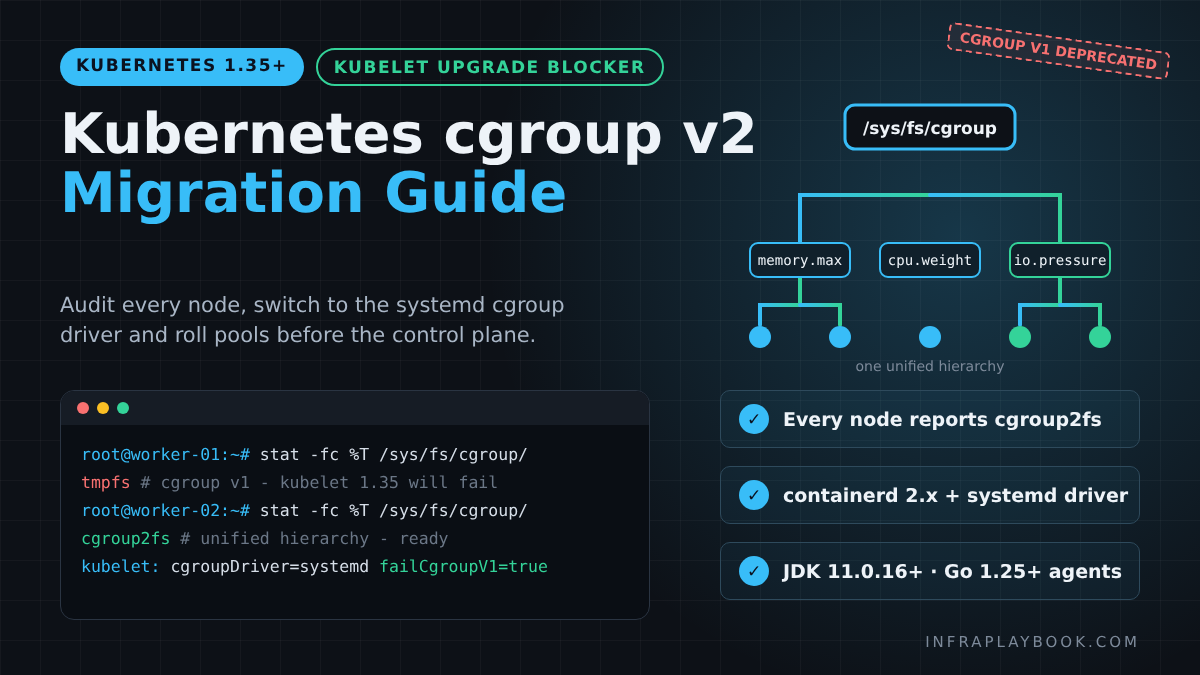
A Kubernetes cgroup v2 migration is now a hard requirement for any cluster moving past v1.34. Since Kubernetes v1.35, the kubelet’s failCgroupV1 setting defaults to true, so the kubelet refuses to start on a node that still runs cgroup v1.
The node goes NotReady in the middle of your upgrade, usually after the control plane is already on the new version. Ubuntu 20.04, RHEL 8 and Amazon Linux 2 nodes are the most common casualties.
This guide shows how to audit every node, switch to cgroup v2 and the systemd cgroup driver, rebuild cloud node groups with Terraform, and roll pools safely before you touch the control plane.
Table of Contents
- Technical Overview & Background
- Core System Prerequisites
- Step-by-Step Kubernetes cgroup v2 Migration
- Architecture & Component Breakdown
- Real-World Use Cases & Enterprise Examples
- Troubleshooting, Edge Cases & Best Practices
- FAQ
- Summary & Key Takeaways
Technical Overview & Background
A Kubernetes cgroup v2 migration is no longer an optional modernisation task. It is an upgrade blocker. Control groups (cgroups) are the Linux kernel feature the kubelet and container runtime use to enforce CPU, memory and I/O limits on every pod.
Linux has shipped two incompatible versions. cgroup v1 uses many separate hierarchies, one per controller. cgroup v2 uses a single unified hierarchy with one consistent interface.
How we got here: the deprecation timeline
Kubernetes has moved toward cgroup v2 in clear, documented stages:
| Kubernetes version | Date | cgroup change |
|---|---|---|
| v1.25 | Aug 2022 | cgroup v2 support graduates to GA |
| v1.31 | Aug 2024 | cgroup v1 support moves into maintenance mode |
| v1.35 | Dec 2025 | failCgroupV1 defaults to true (KEP-5573 beta). Kubelet will not start on v1 nodes unless overridden |
| v1.36 / v1.37 | Apr / Aug 2026 | Same default. v1 still possible only via explicit opt-out |
| v1.38+ | 2027 (earliest) | Earliest release where v1 code removal can begin, per KEP-5573 |
On 6 October 2026, the Kubernetes project published “The Shift to cgroup v2 in Kubernetes”, reinforcing that v2 is the only forward path. The upstream blog states v2 provides “a single unified hierarchy, a more consistent interface” and a stronger base for resource isolation.
Why the kubelet now fails fast
Before 1.35, a cgroup v1 node simply logged a warning. Many teams never noticed. From 1.35, the kubelet exits during startup. The node goes NotReady, and pods are never scheduled there.
This failure surfaces at the worst possible moment: mid-upgrade, after the control plane is already on the new version. That is why the migration must happen before you upgrade past 1.34.
It is not just Kubernetes
The wider Linux ecosystem has moved too. systemd v258 removed support for the legacy and hybrid cgroup v1 hierarchies entirely. New distro releases built on it cannot boot into cgroup v1 at all.
So even if you pin the kubelet escape hatch, your base OS will eventually force the change.
Core System Prerequisites
Before touching a node, confirm the whole stack supports cgroup v2. A single outdated layer will break pods in subtle ways.
Minimum versions
- Linux kernel: 5.8 or later (the Kubernetes documentation’s stated requirement for cgroup v2)
- Container runtime: containerd v1.4+ or CRI-O v1.20+ technically work, but plan for containerd 2.x, since Kubernetes 1.35 is the last minor release supporting containerd 1.x
- OCI runtime: runc v1.0.0-rc91+ or crun with cgroup v2 support
- cgroup driver:
systemdon both the kubelet and the runtime (strongly recommended on v2)
Operating systems that use cgroup v2 by default
- Ubuntu 21.10+ (22.04 LTS or 24.04 LTS recommended)
- Debian 11 (bullseye)+
- RHEL 9, Rocky Linux 9, AlmaLinux 9
- Fedora 31+
- Amazon Linux 2023 (AL2023)
- Bottlerocket (Kubernetes 1.26+ variants)
- Container-Optimized OS (Google) since M97
- Flatcar Container Linux 2969.1.0+
Operating systems that still default to cgroup v1
- Ubuntu 20.04 LTS
- RHEL 8 / CentOS 8 / Rocky 8 / Alma 8
- Amazon Linux 2 (AL2)
- Debian 10 and older enterprise images
Application runtime requirements
Your workloads must also understand cgroup v2. Otherwise they misread their own memory and CPU limits:
- Java: OpenJDK 8u372+, 11.0.16+, or 15+
- Go: Go 1.25+ sets
GOMAXPROCSfrom the container CPU limit natively. Older binaries usinguber-go/automaxprocsneed v1.5.1+ - Monitoring agents: cAdvisor, node-exporter, Datadog, Dynatrace and security agents (Falco, EDR sensors) must be on releases that read the unified hierarchy
Step-by-Step Kubernetes cgroup v2 Migration
The process below works for kubeadm, k3s, RKE2 and self-managed cloud nodes. Managed-service notes follow in the architecture section.
Step 1: Audit every node’s cgroup version
On a single host, run the canonical check:
stat -fc %T /sys/fs/cgroup/
# cgroup2fs  -> cgroup v2 (unified)
# tmpfs      -> cgroup v1 (legacy or hybrid)
You can also confirm with cat /proc/1/cgroup. A single 0::/ line means v2.
For a whole cluster, avoid SSH. Use kubectl debug to inspect each node from an ephemeral pod:
#!/usr/bin/env bash
# audit-cgroup.sh - print cgroup version for every node
set -euo pipefail

for node in $(kubectl get nodes -o jsonpath='{.items[*].metadata.name}'); do
  fs=$(kubectl debug "node/${node}" -q --image=busybox:1.36 \
        --profile=general -- stat -fc %T /host/sys/fs/cgroup 2>/dev/null | tail -n1)
  echo "${node}  ${fs}"
done

# Clean up the debugger pods afterwards
kubectl get pods -o name | grep node-debugger | xargs -r kubectl delete
At the same time, record the runtime version of each node:
kubectl get nodes -o custom-columns=\
NAME:.metadata.name,\
OS:.status.nodeInfo.osImage,\
KERNEL:.status.nodeInfo.kernelVersion,\
RUNTIME:.status.nodeInfo.containerRuntimeVersion
Any node showing tmpfs, a kernel below 5.8, or containerd://1.x goes on your migration list.
Step 2: Choose a strategy — rebuild or switch in place
There are two valid paths:
- Rebuild (recommended): Replace v1 nodes with new nodes on a cgroup v2 OS image. This is cleaner and fits immutable infrastructure.
- In-place switch: Add a kernel boot parameter on the existing OS and reboot. Useful on bare metal, but leaves you on an ageing distro.
For Ubuntu 20.04 and RHEL 8, an in-place switch buys time. It does not fix the fact that Ubuntu 20.04 left standard support in May 2025.
Step 3 (in-place path): enable the unified hierarchy
On Ubuntu 20.04 / Debian 10:
sudo sed -i 's/^GRUB_CMDLINE_LINUX="\(.*\)"/GRUB_CMDLINE_LINUX="\1 systemd.unified_cgroup_hierarchy=1"/' /etc/default/grub
sudo update-grub
# Reboot only after the node is drained (Step 5)
On RHEL 8 / Rocky 8 / Alma 8:
sudo grubby --update-kernel=ALL --args="systemd.unified_cgroup_hierarchy=1"
sudo grubby --info=DEFAULT | grep args
After the reboot, stat -fc %T /sys/fs/cgroup/ must return cgroup2fs.
Step 4: Configure the runtime for the systemd cgroup driver
The kubelet and runtime must agree on the cgroup driver. On cgroup v2 hosts that use systemd, that driver is systemd.
For containerd 2.x (config version 3):
# /etc/containerd/config.toml
version = 3

[plugins.'io.containerd.cri.v1.runtime'.containerd.runtimes.runc]
  runtime_type = 'io.containerd.runc.v2'

  [plugins.'io.containerd.cri.v1.runtime'.containerd.runtimes.runc.options]
    SystemdCgroup = true
For containerd 1.7 (config version 2, only as a stepping stone):
version = 2
[plugins."io.containerd.grpc.v1.cri".containerd.runtimes.runc.options]
  SystemdCgroup = true
For CRI-O, set cgroup_manager = "systemd" in /etc/crio/crio.conf.d/.
Then restart and verify:
sudo systemctl restart containerd
sudo containerd config dump | grep -i SystemdCgroup
Step 5: Configure the kubelet
Set the matching driver and leave the safety check on:
# /var/lib/kubelet/config.yaml
apiVersion: kubelet.config.k8s.io/v1beta1
kind: KubeletConfiguration
cgroupDriver: systemd
failCgroupV1: true          # default from v1.35; keep it explicit
singleProcessOOMKill: false # kill the whole container group on OOM (cgroup v2 behaviour)
Since Kubernetes 1.34, the kubelet can also read the cgroup driver directly from the CRI runtime, which removes one common mismatch. Setting it explicitly is still good practice for auditability.
Step 6: Roll nodes safely
Migrate one node, validate, then batch the rest within your PodDisruptionBudgets:
NODE=worker-01
kubectl cordon "$NODE"
kubectl drain "$NODE" --ignore-daemonsets --delete-emptydir-data --timeout=10m

# Apply OS change / reboot / or replace the instance here

kubectl uncordon "$NODE"
kubectl get node "$NODE" -o wide
kubectl run cg-smoke --rm -it --restart=Never --image=busybox:1.36 \
  --overrides='{"spec":{"nodeName":"'"$NODE"'"}}' \
  -- cat /sys/fs/cgroup/memory.max
If the last command prints a value (such as max) instead of “No such file”, the pod is running under cgroup v2.
Step 7: Rebuild cloud node groups with IaC
On AWS, the cleanest fix for Amazon Linux 2 nodes is a new managed node group on AL2023. AWS stopped publishing EKS-optimized AL2 AMIs after Kubernetes 1.32, and support ended on 26 November 2025.
# Terraform / OpenTofu - EKS managed node group on AL2023 (cgroup v2)
resource "aws_eks_node_group" "general_al2023" {
  cluster_name    = aws_eks_cluster.main.name
  node_group_name = "general-al2023"
  node_role_arn   = aws_iam_role.node.arn
  subnet_ids      = var.private_subnet_ids

  ami_type       = "AL2023_x86_64_STANDARD"
  instance_types = ["m7i.large"]
  capacity_type  = "ON_DEMAND"

  scaling_config {
    desired_size = 3
    min_size     = 3
    max_size     = 9
  }

  update_config {
    max_unavailable_percentage = 33
  }

  labels = {
    "infraplaybook.com/cgroup" = "v2"
  }
}
Create the new group, shift workloads with node selectors or by draining, then delete the AL2 group. Note that AL2023 replaces the old bootstrap.sh with nodeadm, so any custom user data needs rewriting.
Step 8: Validate workloads, not just nodes
A green node can still run a broken workload. Check for these after migration:
- JVM heap sizing: older JDKs ignore v2 limits and size the heap from host RAM, causing OOMKills
- CPU throttling dashboards: v2 uses
cpu.weightinstead ofcpu.shares, so custom dashboards may show different numbers - Agents reading
/sys/fs/cgroup/memory/...: these v1 paths no longer exist
Architecture & Component Breakdown
Understanding the call chain explains most migration failures.
The resource-management chain
- Kubelet receives the pod spec and computes QoS class and limits.
- It calls the CRI runtime (containerd or CRI-O) over gRPC.
- The runtime asks the OCI runtime (runc or crun) to create the container.
- With the systemd driver, the cgroup is created as a systemd slice/scope, such as
kubepods-burstable-pod<uid>.slice. - The kernel enforces limits through the unified files in
/sys/fs/cgroup.
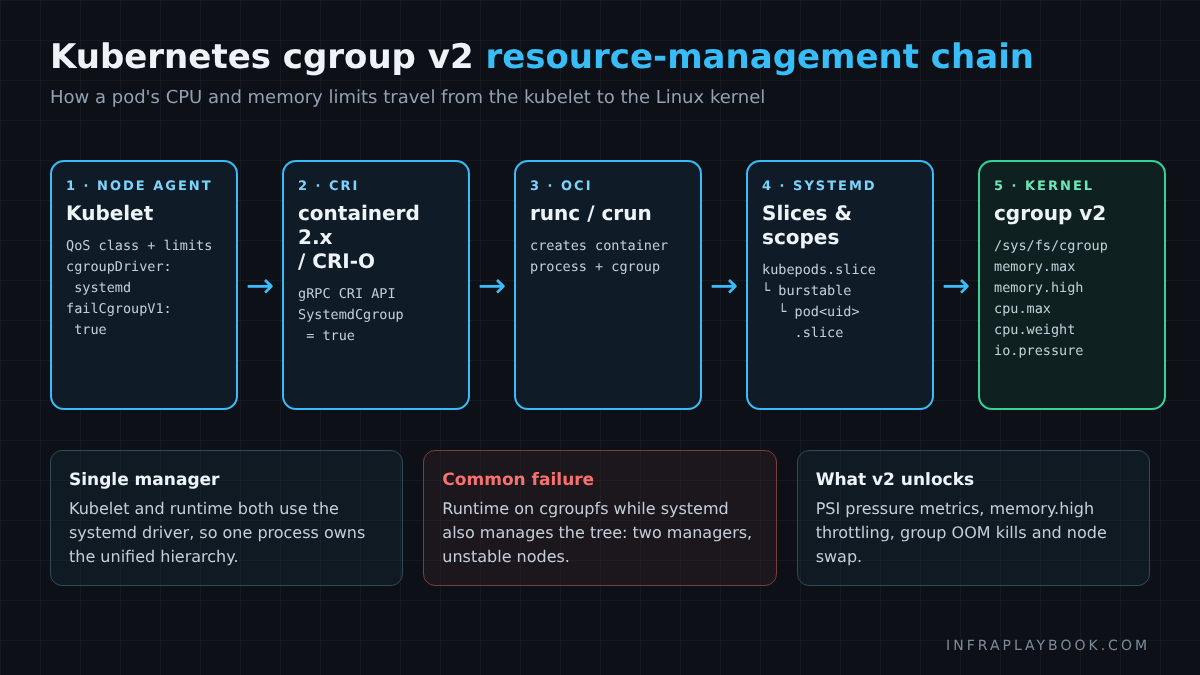
If step 4 uses cgroupfs while systemd also manages the tree, you get two managers fighting over one hierarchy. That is the root cause of many “pods randomly restart” incidents.
v1 versus v2 interface files
| Purpose | cgroup v1 path | cgroup v2 file |
|---|---|---|
| Memory hard limit | memory/memory.limit_in_bytes | memory.max |
| Memory soft throttle | (none, effectively) | memory.high |
| CPU proportional share | cpu/cpu.shares | cpu.weight |
| CPU quota | cpu/cpu.cfs_quota_us | cpu.max |
| Pressure metrics | not available | cpu.pressure, memory.pressure, io.pressure |
| Group OOM kill | not available | memory.oom.group |
What v2 unlocks
- Memory QoS: uses
memory.highto throttle before a hard OOMKill - Pressure Stall Information (PSI): the kubelet can expose CPU, memory and I/O pressure per pod (
KubeletPSIfeature) - Node swap support: Kubernetes swap requires cgroup v2
- Safer rootless and user-namespace isolation
- Whole-container OOM kills, so a crashed worker process does not leave a half-alive container
Managed Kubernetes behaviour
- Amazon EKS: AL2023 and Bottlerocket are cgroup v2. AL2 is v1 and must be replaced.
- Google GKE: COS and Ubuntu node images use cgroup v2 for new node pools on modern versions. Legacy pools configured for v1 must be migrated.
- Azure AKS: Ubuntu 22.04+ and Azure Linux node images use cgroup v2 from Kubernetes 1.25 onward.
Managed control planes handle the kubelet config. You still own custom AMIs, user data, DaemonSets and application compatibility.
Real-World Use Cases & Enterprise Examples
Scenario 1: Self-managed kubeadm cluster on RHEL 8
A typical on-prem platform team runs 30 kubeadm workers on RHEL 8. The plan that works:
- Build a RHEL 9 golden image with containerd 2.x and
SystemdCgroup = true. - Join three new RHEL 9 workers as a canary pool.
- Move stateless workloads with a node selector for one week.
- Drain and retire RHEL 8 workers in batches of five.
- Only then upgrade the control plane from 1.34 to 1.35.
Scenario 2: EKS fleet still on Amazon Linux 2
A SaaS company runs EKS 1.32 with AL2 node groups. They are stuck: AL2 AMIs stop at 1.32, and staying put means extended support pricing (EKS charges $0.60 per cluster-hour in extended support versus $0.10 in standard support).
Creating AL2023 node groups via Terraform clears both problems. It moves nodes to cgroup v2 and unblocks the upgrade path.
Scenario 3: Java-heavy microservices
A bank’s payment services run on OpenJDK 11.0.12. After nodes move to v2, pods begin to OOMKill under load. The JVM no longer detects its memory limit and sizes the heap from host memory.
Upgrading base images to 11.0.16+ (or Java 17/21) and setting -XX:MaxRAMPercentage=75 resolves it. Audit base images before you migrate production nodes.
Scenario 4: GPU and AI inference nodes
GPU nodes often run older vendor images. Confirm that the NVIDIA device plugin and GPU Operator versions support cgroup v2 before rotating those pools. Treat them as a separate wave, since replacement capacity is usually scarce.
Troubleshooting, Edge Cases & Best Practices
Common errors and fixes
Kubelet exits with a cgroup v1 error after upgrade
The node is still on v1 and failCgroupV1 is true. Migrate the node. As a short-term emergency only, you can set this and restart the kubelet:
# Emergency override - remove after migration
failCgroupV1: false
Treat this as technical debt with a deadline. Removal of v1 code can begin from v1.38.
“misconfiguration: kubelet cgroup driver: systemd is different from docker/containerd cgroup driver: cgroupfs”
The runtime and kubelet disagree. Set SystemdCgroup = true in containerd (Step 4) and restart both services.
Pods OOMKilled immediately after migration
Check the application runtime version first (JDK, Node.js, Go). Then compare memory.max inside the pod with the configured limit.
Monitoring shows no container metrics
The agent still reads v1 paths. Upgrade cAdvisor, node-exporter or your vendor agent.
A simple Python check for stale v1 assumptions
Run this inside a container image to confirm the app will see its limits:
#!/usr/bin/env python3
"""cgcheck.py - report cgroup version and effective limits from inside a container."""
from pathlib import Path

root = Path("/sys/fs/cgroup")

if (root / "cgroup.controllers").exists():
    mem = (root / "memory.max").read_text().strip()
    cpu = (root / "cpu.max").read_text().strip()
    print(f"cgroup v2 | memory.max={mem} | cpu.max={cpu}")
else:
    mem = (root / "memory" / "memory.limit_in_bytes").read_text().strip()
    print(f"cgroup v1 | memory.limit_in_bytes={mem}")
Best practices
- Migrate nodes before the control plane. Never let a 1.35 kubelet meet a v1 host for the first time in production.
- Bundle cgroup v2 with containerd 2.x. Both are required past 1.35, so rebuild images once.
- Use the systemd cgroup driver everywhere. Mixed drivers cause unstable nodes.
- Label migrated nodes (for example
infraplaybook.com/cgroup=v2) to steer canary workloads. - Keep the
failCgroupV1: falseoverride out of Git unless it has an owner and an expiry date. - Re-baseline dashboards. CPU weight values differ from v1 shares, and newer runc/crun releases use an updated shares-to-weight conversion formula.
- Test in staging with real pods, not just node health checks.
FAQ
How do I check if my Kubernetes nodes use cgroup v1 or v2?
Run stat -fc %T /sys/fs/cgroup/ on the node. The output cgroup2fs means cgroup v2, and tmpfs means cgroup v1. Across a cluster, run the same command through kubectl debug node/ against /host/sys/fs/cgroup.
Does Kubernetes 1.35 remove cgroup v1 support?
Not fully. Kubernetes 1.35 changes the kubelet failCgroupV1 default to true, so the kubelet refuses to start on cgroup v1 nodes unless you explicitly set it to false. Per KEP-5573, actual code removal can happen no earlier than v1.38.
Can I keep running cgroup v1 on Kubernetes 1.36 or 1.37?
Technically yes, by setting failCgroupV1: false in the kubelet configuration. It is an unsupported, temporary escape hatch. cgroup v1 is in maintenance mode, receives no new features, and modern systemd releases cannot boot v1 at all.
Do EKS, GKE and AKS migrate to cgroup v2 automatically?
Managed node images on current versions already use cgroup v2: AL2023 and Bottlerocket on EKS, COS on GKE, and Ubuntu 22.04+ or Azure Linux on AKS. Amazon Linux 2 nodes, custom AMIs and self-managed node groups still need manual replacement.
Will migrating to cgroup v2 break my Java applications?
Only if they use an old JDK. OpenJDK 8u372+, 11.0.16+ and 15+ are cgroup v2-aware. Older versions misread memory limits, which leads to oversized heaps and OOMKills.
Summary & Key Takeaways
- Kubernetes 1.35+ kubelets refuse to start on cgroup v1 nodes because
failCgroupV1now defaults totrue. - Audit first:
stat -fc %T /sys/fs/cgroup/must returncgroup2fson every node. - Move to a v2 OS: Ubuntu 22.04+, RHEL 9, Debian 11+, AL2023, Bottlerocket or COS.
- Use the systemd cgroup driver in both containerd/CRI-O and the kubelet.
- Pair it with containerd 2.x, since 1.35 is the last release supporting containerd 1.x.
- Check applications: JDK 11.0.16+, Go 1.25+ and current monitoring agents.
- Migrate nodes before the control plane, one pool at a time.
- The
failCgroupV1: falseoverride is temporary; v1 code removal can begin in v1.38.
A Kubernetes cgroup v2 migration is mostly preparation. Audit nodes, rebuild images with a modern OS and containerd 2.x, and validate workloads in staging. Do that in the right order and your next Kubernetes upgrade becomes a routine maintenance window instead of an outage.
For related upgrade work, see our guides on the Ingress NGINX to Gateway API migration and OpenTofu vs Terraform in 2026.
Editorial note: Version behaviour comes from the Kubernetes project: KEP-5573 (Remove cgroup v1 support), the Kubernetes cgroup v2 documentation and the October 2026 post The Shift to cgroup v2 in Kubernetes. Amazon Linux 2 dates follow the Amazon EKS AL2 AMI deprecation FAQ. Distro defaults change with point releases, so verify on a staging node before changing production.