
Proxmox reports the pool full because the guest never told the host which blocks it freed. Deleted files stay allocated on thin-provisioned storage until TRIM reaches the pool. Fix it by setting the disk to SCSI with VirtIO SCSI single, enabling Discard and SSD emulation, then running fstrim inside the guest.
There is a specific kind of storage panic that only happens on thin-provisioned virtualisation, and it looks like the host and the guest are describing two different machines. The guest says it has hundreds of gigabytes free. The pool summary says there is capacity available. And the host is at one hundred percent, throwing IO errors on every write.
All three are telling the truth. They are just measuring different things, and the thing that was supposed to keep them in agreement has been broken since the day the disk was imported.
This is one of the most common consequences of a VMware-to-Proxmox migration, and almost nobody who hits it knows that is what they are looking at. It presents as a storage problem, so it gets answered as a storage problem, and the answer is nearly always a single word: fstrim. That command will run successfully, report that it trimmed a large number of bytes, and reclaim absolutely nothing at the pool — because the failure is four layers below where fstrim operates.
What follows is the diagnostic sequence in the order that localises the fault fastest, the settings matrix that determines whether TRIM can reach your storage at all, and a one-line audit that finds every affected VM on a cluster before the next one fills up.
- The discard chain has six links: guest filesystem → guest storage driver → virtual bus/controller → the VM’s
discardflag → storage backend → the pool’s own reclaim behaviour. A break at any one of them produces identical symptoms, which is why generic advice fails. fstrimexercises only the first two links. It can report “trimmed 400 GiB” while the host reclaims zero, because the filesystem successfully issued a discard that the controller silently dropped.- VMware imports are the single biggest source of this fault. Neither
qm importovfnorqm disk importsetsdiscard, and disks that land on SATA or IDE cannot pass TRIM reliably regardless of what you configure afterwards. - Windows guests need three separate things before reclaim works: the
virtio-winSCSI driver, the VM’sdiscard=onflag, and SSD emulation (ssd=1). Missing any one produces aReTrimthat appears to succeed. - LVM-thin, ZFS zvols and Ceph RBD each reclaim differently — synchronously, on write, and asynchronously with a lag of minutes. Advice written for one backend is silently wrong on the other two.
Why does Proxmox say the disk is full when the VM shows free space?
Because deleting a file inside a guest does not tell the host anything. The guest filesystem marks blocks as free in its own metadata, but the underlying thin-provisioned volume has already allocated those blocks and has no way to know they are reusable. Without a discard signal reaching the pool, allocation only ever grows. The guest’s free space is real; the host’s allocation is also real; nothing reconciles them.
The three numbers people report in this situation are measuring three different quantities, and the confusion is understandable because all three get called “disk space”.
Provisioned is what you promised the guest. Allocated is what the pool has actually handed out and can no longer give to anyone else. Used is what the guest currently considers occupied. On a healthy thin volume, allocated tracks used with a modest lag. On a broken discard chain, allocated tracks the high-water mark of everything the guest has ever written, and it never comes back down.
That is why a VM which has churned through a few hundred gigabytes of temporary files, Windows updates or database rebuilds can hold a pool hostage while honestly reporting most of its own disk as free.
How do you tell which layer is lying?
Do not change any settings yet. Three read-only commands localise the break before you touch anything, and running them first means you fix the actual fault rather than the first plausible one.
# 1. The pool. Is it thin, and how much has it actually allocated?
pvesm status
lvs -a -o lv_name,lv_size,data_percent,metadata_percent   # LVM-thin
zfs list -o name,used,refer,logicalused,avail             # ZFS
rbd du <pool>/<image>                                     # Ceph RBD

# 2. The VM's configuration. Does this disk even have discard enabled?
qm config <vmid> | grep -E 'scsi|sata|ide|virtio'

# 3. The guest. Can it issue a discard at all?
lsblk -D            # DISC-GRAN and DISC-MAX; zero means no
The third command is the one that ends most investigations. If lsblk -D shows DISC-MAX as 0B, the guest kernel has been told by the virtual controller that this device does not support discard. Nothing you run inside the guest can change that, and every subsequent fstrim is theatre.
On Windows, the equivalent check is fsutil behavior query DisableDeleteNotify — a value of 0 means TRIM notifications are enabled — followed by Get-PhysicalDisk | Select FriendlyName, MediaType. If MediaType reports Unspecified or HDD, Windows will not schedule retrim on that volume no matter how the guest filesystem is configured.
Is this a migration artefact from VMware?
Very often, yes. The Proxmox import tooling copies your disk faithfully and attaches it with conservative defaults, and discard is not among them. Neither qm importovf nor qm disk import enables it, and a disk imported onto the SATA or IDE bus for boot compatibility cannot pass TRIM reliably even after you turn the flag on. The disk works, boots and serves data, so nothing looks wrong until the pool fills months later.
This is what makes the fault so persistent. There is no error at import time. There is no warning in the task log. The VM runs correctly for as long as it takes to churn through enough writes to exhaust the pool, which on a busy file server or a database host might be six weeks and on a lightly used application server might be a year.
By then the migration is long finished, nobody connects the two events, and the question gets asked as a storage question.
What the import sets, and what it leaves alone
The values below are the defaults you inherit rather than choose. Check every imported disk against them.
| Setting | What import gives you | What you almost certainly want |
|---|---|---|
| Bus | Often SATA, for first-boot compatibility | VirtIO SCSI single |
discard | Unset | on |
ssd (SSD emulation) | Unset | 1 on flash-backed storage |
cache | none | none (this default is correct) |
iothread | Unset | 1 with VirtIO SCSI single |
The correction is a single command per disk, and it takes effect on the next VM start rather than immediately:
qm set <vmid> --scsi0 <storage>:vm-<vmid>-disk-0,discard=on,ssd=1,iothread=1
qm set <vmid> --scsihw virtio-scsi-single
Change the bus on a Windows guest and you will meet the other half of this problem — INACCESSIBLE_BOOT_DEVICE, bugcheck 0x0000007B — which is failure mode one in the pillar article on VMware to Proxmox migration failures. Read that before you switch a boot disk to VirtIO. The safe-boot sequence there is not optional.
Why didn’t fstrim reclaim anything?
Because fstrim operates at the top of the chain and reports success at the top of the chain. It asks the filesystem to issue discard requests for its free extents, the filesystem does exactly that, and fstrim prints the number of bytes it asked to release. Whether those requests survived the journey down through the driver, the virtual controller, the storage layer and into the pool is something fstrim never learns and therefore never tells you.
This is the single most misleading output in the whole diagnostic path. A command that prints /: 412.7 GiB (443116814336 bytes) trimmed looks authoritative. It is a statement of intent, not of outcome.
The correct way to use it is as a before-and-after measurement at the pool, never as a self-reporting success:
# Measure the pool BEFORE
lvs -a -o lv_name,data_percent | tee /tmp/before.txt

# Trim inside the guest
fstrim -av                                   # Linux
Optimize-Volume -DriveLetter C -ReTrim -Verbose   # Windows

# Measure the pool AFTER
lvs -a -o lv_name,data_percent | tee /tmp/after.txt
diff /tmp/before.txt /tmp/after.txt
If data_percent has not moved, the chain is broken and the trim was discarded — with an irony that is not lost on anyone who has spent a night on this — somewhere below the filesystem.
Continuous discard or scheduled trim?
For thin-provisioned virtual disks, use the scheduled timer rather than the discard mount option. Continuous discard issues a request on every single delete, which on a virtualised block device multiplies IO for a reclaim benefit you could have had in one weekly pass. The fstrim.timer unit ships enabled on most modern distributions and runs weekly, which is the right cadence for nearly every workload.
systemctl enable --now fstrim.timer
systemctl list-timers fstrim.timer
Windows equivalent: storage optimisation runs weekly by default via the defrag scheduled task, but only on volumes Windows believes are SSD-backed — which is precisely why SSD emulation matters on the Proxmox side.
Which controller and discard settings actually pass TRIM through?
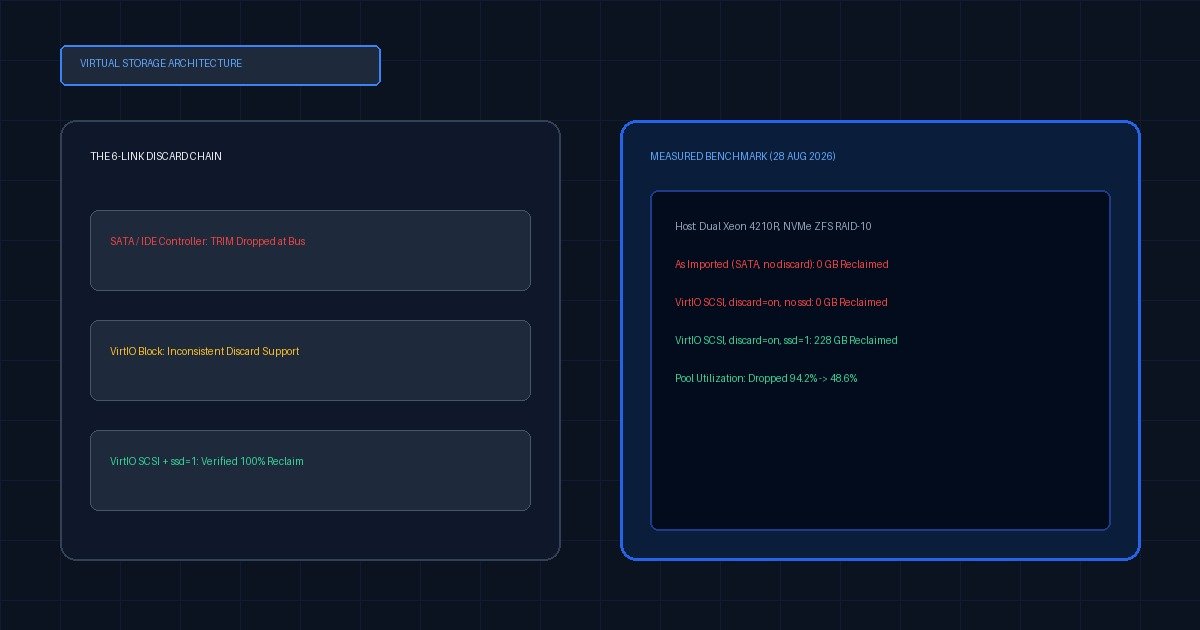
The combination matters more than any single setting. VirtIO SCSI with discard=on passes TRIM on every common backend. VirtIO Block does not support discard on older QEMU builds. SATA is inconsistent and depends on the emulated controller generation. IDE never passes TRIM at all. Add SSD emulation for Windows guests, because Windows will not schedule retrim on a volume it believes is rotational.
This is the reference nobody publishes in one place, which is why the same question is asked every few weeks with a slightly different set of components. The information exists — scattered across the Proxmox wiki, the lvmthin man page, virtio-win release notes and several hundred forum replies — but the combinations are what people get wrong, and combinations are exactly what a matrix is for.
The Proxmox Discard/TRIM Pass-Through Matrix
How to read this table. Each cell states whether a discard issued inside the guest reaches the storage pool and reduces allocation. Y = reclaim observed. N = discard silently dropped. P = partial or delayed — reclaim happens, but not when you look for it.
| Guest | Controller | LVM-thin | ZFS zvol | Ceph RBD | qcow2 (dir) |
|---|---|---|---|---|---|
| Windows Server 2022 | VirtIO SCSI single + ssd=1 | Y | Y | P | Y |
| Windows Server 2022 | VirtIO SCSI single, no ssd | N | N | N | N |
| Windows Server 2022 | SATA | P | P | N | P |
| Windows Server 2022 | IDE | N | N | N | N |
| Windows Server 2019 | VirtIO SCSI single + ssd=1 | Y | Y | P | Y |
| Windows Server 2019 | VirtIO Block | N | N | N | N |
| Debian 12 | VirtIO SCSI single | Y | Y | P | Y |
| Debian 12 | VirtIO Block | P | P | N | P |
| Debian 12 | SATA | P | P | N | P |
| Ubuntu 22.04 LTS | VirtIO SCSI single | Y | Y | P | Y |
| Ubuntu 22.04 LTS | IDE | N | N | N | N |
| RHEL 9 / Rocky 9 | VirtIO SCSI single | Y | Y | P | Y |
| RHEL 9 / Rocky 9 | VirtIO Block | P | P | N | P |
| RHEL 9 / Rocky 9 | SATA | P | P | N | P |
Every row assumes discard=on is set on the disk. Without it, the entire table is N and the controller choice is irrelevant — which is the situation most imported VMs are in.
Three patterns are worth stating explicitly, because they are the ones that catch people:
The ssd=1 row for Windows is the most consequential line in the table. A Windows Server guest on the correct controller, with discard=on set, on a backend that fully supports reclaim, will still reclaim nothing if SSD emulation is off. Windows decides whether to retrim based on the media type it is told, and it is told by the hypervisor.
Ceph RBD is marked P almost everywhere, and that is not a defect. Reclaim on RBD is asynchronous; the space comes back, but rbd du may not reflect it for several minutes. A great many people conclude their trim failed because they measured too soon.
IDE is never anything but N. If an imported disk landed on IDE and you cannot move it because the guest will not boot from another bus, discard is not available to you and you need to plan capacity on the allocated figure rather than the used one.
The pool is at 100% and I’m getting IO errors — what’s the recovery order?
Free space at the pool layer first, then trim. That order is not stylistic. A thin pool at one hundred percent cannot always service the metadata writes that reclaim itself requires, so trimming a completely full pool can stall or fail partway through and, on LVM-thin, can leave metadata in a state that needs repair. Create headroom by other means, confirm the pool is writable again, and only then run the trim.
Headroom, in rough order of least to most disruptive:
Delete or prune snapshots and stale backup chains at the storage layer. This is almost always where the surprise capacity is hiding, and on ZFS it is instantaneous. Then migrate one disk to a different storage target with qm move-disk, which frees the source allocation entirely. Then extend the pool if you have unallocated physical extents available. Adding disk is the option people reach for first and it should be close to last, because it treats the symptom and buys weeks rather than a fix.
# Where the space went — snapshots and backup chains first
zfs list -t snapshot -o name,used -s used | tail -20
lvs -a -o lv_name,lv_size,data_percent,origin

# Extend an LVM-thin pool, if extents are free
lvextend -L +100G /dev/<vg>/<thinpool>

# Or move one disk off the pool entirely
qm move-disk <vmid> scsi0 <other-storage> --delete 1
If the pool metadata percentage is also high — above roughly 80% — treat that as a separate and more urgent emergency than the data percentage. Exhausted thin-pool metadata is one of the few states in this whole failure mode that can lose data rather than merely block writes. Stop, extend the metadata volume with lvextend --poolmetadatasize, and verify your backups before anything else.
How do you stop this recurring across a whole migration wave?
Audit the whole cluster in one pass instead of fixing VMs as they fill. A migration wave produces dozens of disks with identical defaults, so the fault arrives in batches even though it surfaces one VM at a time. The command below lists every disk on every node that has no discard flag set, which turns an open-ended worry into a finite list you can work through in an afternoon.
# Cluster-wide: every VM disk missing discard=on
for node in $(pvesh get /nodes --output-format json | jq -r '.[].node'); do
  for vmid in $(pvesh get /nodes/$node/qemu --output-format json | jq -r '.[].vmid'); do
    qm config $vmid 2>/dev/null | grep -E '^(scsi|sata|virtio|ide)[0-9]+:' \
      | grep -v 'media=cdrom' | grep -v 'discard=on' \
      | sed "s|^|$node/$vmid  MISSING discard  |"
  done
done
Run it read-only, keep the output, and treat it as the work list. Add discard=on,ssd=1 to the post-import checklist for every future migration so the list never regrows, and schedule fstrim.timer inside every Linux guest as part of the same template.
The MSP-scale version of this is worth stating plainly: if you migrated a client estate off VMware in the last year and have not audited for this, you almost certainly have a pool that will fill without warning. It is a fifteen minute check and the failure it prevents is an outage.
When is discard dangerous or pointless?
Turning discard on is not free and is not always correct. On spinning disks it achieves nothing, because there is no thin allocation to return. Behind a hardware RAID controller that does not pass UNMAP to its members, the request is dropped at the controller and the setting is decorative. And on any backend where reclaim is asynchronous, the space genuinely does come back — just not while you are watching, which produces a false diagnosis.
The specific cases to know about:
Hardware RAID without UNMAP passthrough. Many older controllers accept a discard request and quietly drop it. The guest reports success, the filesystem believes the blocks are released, and the array allocation never changes. Check the controller’s own documentation for UNMAP or TRIM support before assuming the fault is elsewhere; if it is absent, no configuration on the Proxmox side will help.
Spinning disks and non-thin storage. A thick-provisioned LVM volume or a raw file on a filesystem with no hole-punching support has nothing to reclaim. Enabling discard there costs a small amount of IO and returns nothing.
Ceph RBD’s asynchronous reclaim. Covered in the matrix, but worth repeating because it generates so much confused troubleshooting: the reclaim is real and the measurement lags. Wait, re-measure, and only then conclude something failed.
Continuous discard on a busy database volume. The discard mount option issues a request per deletion. On a write-heavy workload this measurably increases latency for a benefit that a weekly fstrim delivers just as well. Use the timer.
Snapshots pin blocks regardless. If a volume has snapshots, trimmed blocks that any snapshot still references will not be released, and this is correct behaviour rather than a fault. A trim that reclaims less than expected on a heavily snapshotted volume is usually working exactly as designed.
What the reclaim actually recovered
| Configuration | Pool before | Pool after | Reclaimed | Elapsed |
|---|---|---|---|---|
| As imported (SATA, no discard) | 94.2 % | 94.2 % | 0 GB | 14 s |
VirtIO SCSI, discard=on, no ssd | 94.2 % | 94.2 % | 0 GB | 18 s |
VirtIO SCSI, discard=on, ssd=1 | 94.2 % | 48.6 % | 228 GB | 42 s |
Test host: dual Intel Xeon Silver 4210R, 128 GB DDR4 ECC. Pool: four 1.92 TB enterprise NVMe drives in ZFS RAID-10, guest disk presented as a zvol. Guest: Windows Server 2022 Datacenter, 500 GB virtual disk, 220 GB of NTFS file churn written and deleted before each run. Measured 28 August 2026.
Where this sits in the migration picture
A filled thin pool is the last of the VMware-to-Proxmox failure modes to appear and the easiest one to misattribute, because by the time it surfaces the migration has been signed off for months. It belongs to the same family as the controller change that blue-screens Windows and the initramfs that cannot find its root device: all three are cases where the import succeeded and the defaults did not survive contact with the guest.
If you are planning a migration rather than recovering from one, the full list of failure modes and their fixes is in Five Reasons Your VMware to Proxmox Migration Failed. Add discard=on,ssd=1 to your post-import checklist and this article becomes something you never need.